
MPUSP/snakemake-ont-bacterial-variants


A Snakemake workflow for the identification of variants in bacterial genomes using nanopore long-read sequencing.
Overview
Latest release: v1.1.1, Last update: 2026-03-24
Share link: https://snakemake.github.io/snakemake-workflow-catalog?wf=MPUSP/snakemake-ont-bacterial-variants
Quality control: linting: passed formatting: passed
Topics: bioinformatics-pipeline conda nanopore singularity snakemake variant-calling workflow
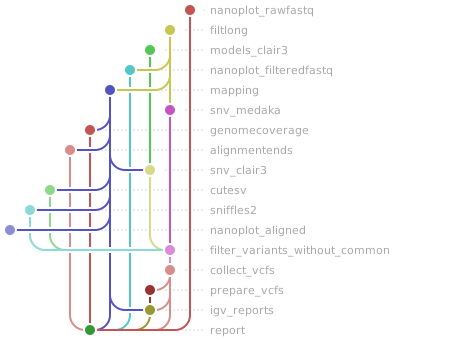
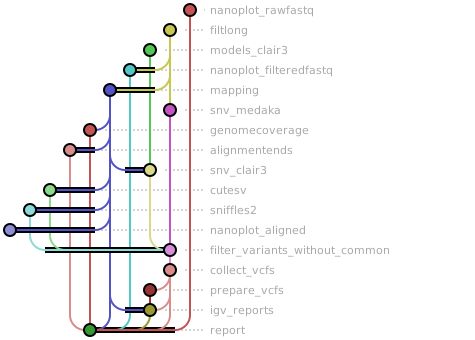
Workflow Rule Graph
This visualization of the workflow’s rule graph was automatically generated using Snakevision
Deployment
Step 1: Install Snakemake and Snakedeploy
Snakemake and Snakedeploy are best installed via the Conda package manager. It is recommended to install conda via Miniforge. Run
conda create -c conda-forge -c bioconda -c nodefaults --name snakemake snakemake snakedeploy
to install both Snakemake and Snakedeploy in an isolated environment. For all following commands ensure that this environment is activated via
conda activate snakemake
For other installation methods, refer to the Snakemake and Snakedeploy documentation.
Step 2: Deploy workflow
With Snakemake and Snakedeploy installed, the workflow can be deployed as follows. First, create an appropriate project working directory on your system and enter it:
mkdir -p path/to/project-workdir
cd path/to/project-workdir
In all following steps, we will assume that you are inside of that directory. Then run
snakedeploy deploy-workflow https://github.com/MPUSP/snakemake-ont-bacterial-variants . --tag v1.1.1
Snakedeploy will create two folders, workflow and config. The former contains the deployment of the chosen workflow as a Snakemake module, the latter contains configuration files which will be modified in the next step in order to configure the workflow to your needs.
Step 3: Configure workflow
To configure the workflow, adapt config/config.yml to your needs following the instructions below.
Step 4: Run workflow
The deployment method is controlled using the --software-deployment-method (short --sdm) argument.
To run the workflow with automatic deployment of all required software via conda/mamba, use
snakemake --cores all --sdm conda
Snakemake will automatically detect the main Snakefile in the workflow subfolder and execute the workflow module that has been defined by the deployment in step 2.
For further options such as cluster and cloud execution, see the docs.
Step 5: Generate report
After finalizing your data analysis, you can automatically generate an interactive visual HTML report for inspection of results together with parameters and code inside of the browser using
snakemake --report report.zip
Configuration
The following section is imported from the workflow’s config/README.md.
Running the workflow
Input data
The workflow requires the following files to be located in the data directory:
Whole-genome sequencing data in
*.fastq.gzformat indata/fastqReference genome(s) in
*.faformat indata/reference
Optionally, users can provide:
Reference genome annotation in
*.gffformat indata/annotation(for feature annotation in IGV report)A
*.bedfile with genomic regions to ignore for variant calling indata/masked_region
Please ensure that the chromosome names in *.gff and *.bed files are the same as in the reference genome.
Input data files are provided in the samples.tsv table, whose location is inidcated in the config.yml file. The samplesheet must comply with the following structure:
sampledefines the sample name that will be used throughout the workflow and thus needs to be unique.fastqprovides the path to the sample’s*.fastq.gzfile.referenceprovides the path to the reference genome*.fafile (may be the same for several / all samples).annotationprovides the path to the optional reference genome annotation in*.gfffile (may be the same for several / all samples). If no annotation is provided, you must entern/a!masked_regionsprovides the path to the optional*.bedfile for filtering genomic regions (may be the same for several / all samples). If no*.bedfile is provided, you must entern/a!
sample |
fastq |
reference |
annotation |
masked_regions |
|---|---|---|---|---|
<sample1> |
data/fastq/<fastq1>.fastq.gz |
data/reference/<ref1>.fa |
data/annotation/<anno1>.gff |
data/masked_region/<region1>.bed |
<sample2> |
data/fastq/<fastq2>.fastq.gz |
data/reference/<ref2>.fa |
data/annotation/<anno2>.gff |
data/masked_region/<region2>.bed |
… |
… |
… |
… |
… |
<sampleN> |
data/fastq/<fastqN>.fastq.gz |
data/reference/<refN>.fa |
data/annotation/<annoN>.gff |
data/masked_region/<regionN>.bed |
Configuration and parameters
Before executing the workflow, you may want to adjust several options and parameters in the default config file config/config.yml:
Directories:
indir: Input directory for all input files,databy default (see above)outdir: Output directory (relative to working directory),resultsby default
Sample information:
samples: Path to samplesheet (relative to working directory),samplesheet/samples.tsvby defaultlibprepkit: Kit from ONT used for library preparation, e.g.SQK-NBD114.24basecalling_model: Model used for basecalling of raw sequencing data (required for variant calling usingMedaka), currently supported models are:r1041_e82_400bps_sup_v4.2.0r1041_e82_400bps_sup_v4.3.0
Tool parameters:
The number of cores can be adjusted here for the following tools:
NGMLR,NanoPlot,MultiQC,Medaka,Clair3,Sniffles2, andcuteSVYou may further adjust the run parameters for the following tools (please refer to the reference provided for more details on run parameters):
Filtlong: By default, reads are filtered for a minimum length of 500 bp and a mean accuracy of at least 90% (Q10), with 90% of the longest and highest-quailty reads to be kept.Clair3: Variants are called on all contigs in a haploid-sensitive, ONT-specific mode using--include_all_ctgs --haploid_sensitive --platform ont.cuteSV: Variants are called with the suggested parameters for ONT data (--max_cluster_bias_INS 100 --diff_ratio_merging_INS 0.3 --max_cluster_bias_DEL 100 --diff_ratio_merging_DEL 0.3) and the genotyping option enabled (--genotype).
Filtering of variants:
The variant quality thresholds can be adjusted here for all four variant callers
remove_common_variants: IfTrue, variants which have been identified in all samples with the same reference genome by one tool are filtered out. This is helpful in case all samples derive from a strain, whose genome sequence already differs from the used reference sequence. IfFalse, all variants are reported.
Reporting options:
igv_region_length: Neighboring variants with a maximum bp distance indicated here [1 by default] are reported in one region in the IGV variant report. Increasing this parameter will reduce the file size of the resulting IGV HTML report, if hotspots / regions with many variants exist in a sample.
Workflow parameters
The following table is automatically parsed from the workflow’s config.schema.y(a)ml file.
Parameter |
Type |
Description |
Required |
Default |
|---|---|---|---|---|
indir |
string |
Input directory containing workflow data files. |
yes |
data |
outdir |
string |
Output directory for all generated results. |
yes |
results |
samples |
string |
Path to the sample sheet TSV file. |
yes |
samplesheet/samples.tsv |
libprepkit |
string |
Oxford Nanopore library preparation kit identifier. |
yes |
SQK-NBD114.24 |
basecalling_model |
string |
Basecalling model identifier used by Dorado. |
yes |
r1041_e82_400bps_sup_v4.3.0 |
filtlong |
Filtlong filtering options. |
yes |
||
. params |
array |
List of command-line parameters passed to Filtlong. |
yes |
|
ngmlr |
NGMLR resource settings. |
yes |
||
. threads |
integer |
Number of CPU threads allocated to NGMLR. |
yes |
20 |
nanoplot |
NanoPlot resource settings. |
yes |
||
. threads |
integer |
Number of CPU threads allocated to NanoPlot. |
yes |
5 |
multiqc |
MultiQC resource settings. |
yes |
||
. threads |
integer |
Number of CPU threads allocated to MultiQC. |
yes |
5 |
medaka |
Medaka resource settings. |
yes |
||
. threads |
integer |
Number of CPU threads allocated to Medaka. |
yes |
10 |
clair3 |
Clair3 resource and parameter settings. |
yes |
||
. threads |
integer |
Number of CPU threads allocated to Clair3. |
yes |
10 |
. params |
array |
List of command-line parameters passed to Clair3. |
yes |
|
sniffles2 |
Sniffles2 resource settings. |
yes |
||
. threads |
integer |
Number of CPU threads allocated to Sniffles2. |
yes |
10 |
cutesv |
cuteSV resource and parameter settings. |
yes |
||
. threads |
integer |
Number of CPU threads allocated to cuteSV. |
yes |
10 |
. params |
array |
List of command-line parameters passed to cuteSV. |
yes |
|
quality_threshold |
Minimum quality score thresholds for variant filtering by caller. |
yes |
||
. medaka |
integer |
Minimum QUAL threshold for Medaka variants. |
yes |
10 |
. clair3 |
integer |
Minimum QUAL threshold for Clair3 variants. |
yes |
5 |
. sniffles2 |
integer |
Minimum QUAL threshold for Sniffles2 variants. |
yes |
10 |
. cutesv |
integer |
Minimum QUAL threshold for cuteSV variants. |
yes |
5 |
remove_common_variants |
boolean |
Filter out variants observed across all samples sharing a reference genome. |
yes |
true |
igv_region_length |
integer |
Maximum base-pair distance to merge neighboring variants into one IGV report region. |
yes |
1 |
Linting and formatting
Linting results
All tests passed!
Formatting results
All tests passed!