
TMs-code/phagefactor


Structure-aware functional annotation of phage genomes.
Overview
Latest release: v1.2.0, Last update: 2026-10-29
Share link: https://snakemake.github.io/snakemake-workflow-catalog?wf=TMs-code/phagefactor
Quality control: linting: failed formatting: failed
Topics: curation-tool phage-genomics structure-prediction
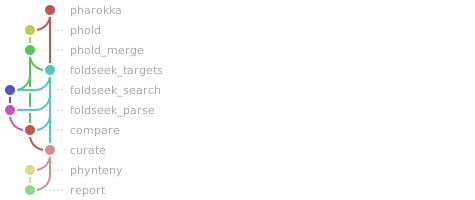
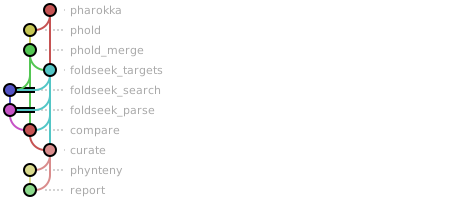
Workflow Rule Graph
This visualization of the workflow’s rule graph was automatically generated using Snakevision
Deployment
Step 1: Install Snakemake and Snakedeploy
Snakemake and Snakedeploy are best installed via the Conda package manager. It is recommended to install conda via Miniforge. Run
conda create -c conda-forge -c bioconda -c nodefaults --name snakemake snakemake snakedeploy
to install both Snakemake and Snakedeploy in an isolated environment. For all following commands ensure that this environment is activated via
conda activate snakemake
For other installation methods, refer to the Snakemake and Snakedeploy documentation.
Step 2: Deploy workflow
With Snakemake and Snakedeploy installed, the workflow can be deployed as follows. First, create an appropriate project working directory on your system and enter it:
mkdir -p path/to/project-workdir
cd path/to/project-workdir
In all following steps, we will assume that you are inside of that directory. Then run
snakedeploy deploy-workflow https://github.com/TMs-code/phagefactor . --tag v1.2.0
Snakedeploy will create two folders, workflow and config. The former contains the deployment of the chosen workflow as a Snakemake module, the latter contains configuration files which will be modified in the next step in order to configure the workflow to your needs.
Step 3: Configure workflow
To configure the workflow, adapt config/config.yml to your needs following the instructions below.
Step 4: Run workflow
The deployment method is controlled using the --software-deployment-method (short --sdm) argument.
To run the workflow with automatic deployment of all required software via conda/mamba, use
snakemake --cores all --sdm conda
Snakemake will automatically detect the main Snakefile in the workflow subfolder and execute the workflow module that has been defined by the deployment in step 2.
For further options such as cluster and cloud execution, see the docs.
Step 5: Generate report
After finalizing your data analysis, you can automatically generate an interactive visual HTML report for inspection of results together with parameters and code inside of the browser using
snakemake --report report.zip
Configuration
The following section is imported from the workflow’s config/README.md.
Configuration
phageFACTor reads two files from the config/ folder of the directory it is
launched from (the project dir):
File |
Holds |
Edit before the first run |
|---|---|---|
|
the science: database locations, FoldSeek tiers, curation thresholds, host genus |
|
|
what to run and where: input/search mode, Phynteny on/off, SLURM partition/QOS, resources per step |
optional (every key defaults to a sensible value) |
Full reference: docs/configure.md.
Input
Put the sequences in input/fasta/ next to config/:
genome mode: one nucleotide FASTA per prophage, plus
input/prophage_list.txtwith one prophage name (FASTA file stem) per line;protein mode: one or more protein FASTA files (
.faa);pangenome mode: one nucleotide FASTA of gene sequences.
The mode is detected from the FASTA files (input_mode: auto). Details:
docs/modes.md.
Databases
The databases (Pharokka, Phold, FoldSeek: AFDB-SwissProt, PDB100, optionally
AFDB50) are not downloaded by the workflow. Download them once per machine and set
databases.db_root in config/config.yaml to their folder:
conda create -n phagefactor -c conda-forge -c bioconda phagefactor   # provides the helper
conda run -n phagefactor phagefactor databases /path/to/db_dir --all
docs/databases.md lists the sizes and how to download
only a subset (the FoldSeek search can also run on the FoldSeek web server:
search_mode: webapi).
Running as a Snakemake module
Deployed with snakedeploy, the workflow runs with plain Snakemake:
snakedeploy deploy-workflow https://github.com/TMs-code/phagefactor . --tag v1.2.0
snakemake --cores all --sdm conda                     # this machine
snakemake --sdm conda --executor slurm --jobs 50      # SLURM
The config handed to the module may hold both files’ keys: the sections of
config.yaml (project, paths, databases, foldseek, compare, curate,
phynteny, precomputed) are merged over config/config.yaml, every other key
is a workflow.yaml setting. --config phynteny=false switches Phynteny off.
With --sdm conda, Snakemake builds envs/phagefactor.yaml and
envs/phynteny.yaml itself; the first Phynteny job downloads its models into
the env (needs internet). The Phold database must then be in <db_root>/phold_db
(or databases.phold_db): a Phold database installed inside another env is not
seen. Without --sdm conda, jobs run in the named
environments set by tools_env / phynteny_env (see
docs/snakemake.md).
Linting and formatting
Linting results
1/home/runner/work/snakemake-workflow-catalog/snakemake-workflow-catalog/.pixi/envs/default/lib/python3.13/site-packages/google/auth/transport/grpc.py:43: FutureWarning: grpcio < 1.83.0 does not support Post-Quantum Cryptography (PQC). Support for non-PQC environments is deprecated. In April 2027, google-auth will raise its minimum requirements to enforce grpcio >= 1.83.0. For more details on Google Cloud's post-quantum security migration, visit: https://cloud.google.com/security/resources/post-quantum-cryptography
2  warnings.warn(
3Creating specified working directory /tmp/tmpz1hsuvb8/TMs-code-phagefactor-90c3d42/runs/run.
4WorkflowError in file "/tmp/tmpz1hsuvb8/TMs-code-phagefactor-90c3d42/workflow/Snakefile", line 290:
5Input auto-detection failed:
6ERROR: FASTA directory not found: /tmp/tmpz1hsuvb8/TMs-code-phagefactor-90c3d42/input/fasta
7Set it explicitly: --config input_mode=genome|protein|pangenome
8  File "/tmp/tmpz1hsuvb8/TMs-code-phagefactor-90c3d42/workflow/Snakefile", line 290, in <module>
Formatting results
1[DEBUG]
2[DEBUG] In file "/tmp/tmpz1hsuvb8/TMs-code-phagefactor-90c3d42/workflow/Snakefile":  Formatted content is different from original
3[INFO] 1 file(s) would be changed 😬
4
5snakefmt version: 0.11.5