
gynecoloji/snakemake_ChIPseq


Reproducible Snakemake ChIP-seq pipeline: Bowtie2 → MACS2 (narrow/broad, input/IgG control) → IDR & consensus peaks → ENCODE-grade QC → differential binding, peak annotation & motif enrichment. Containerized (Docker/Apptainer)
Overview
Latest release: v0.2.0, Last update: 2026-07-30
Share link: https://snakemake.github.io/snakemake-workflow-catalog?wf=gynecoloji/snakemake_ChIPseq
Quality control: linting: failed formatting: failed
Topics: apptainer chipseeker deeptools differential-binding docker epigenomics homer idr macs2 motif-enrichment peak-calling snakemake
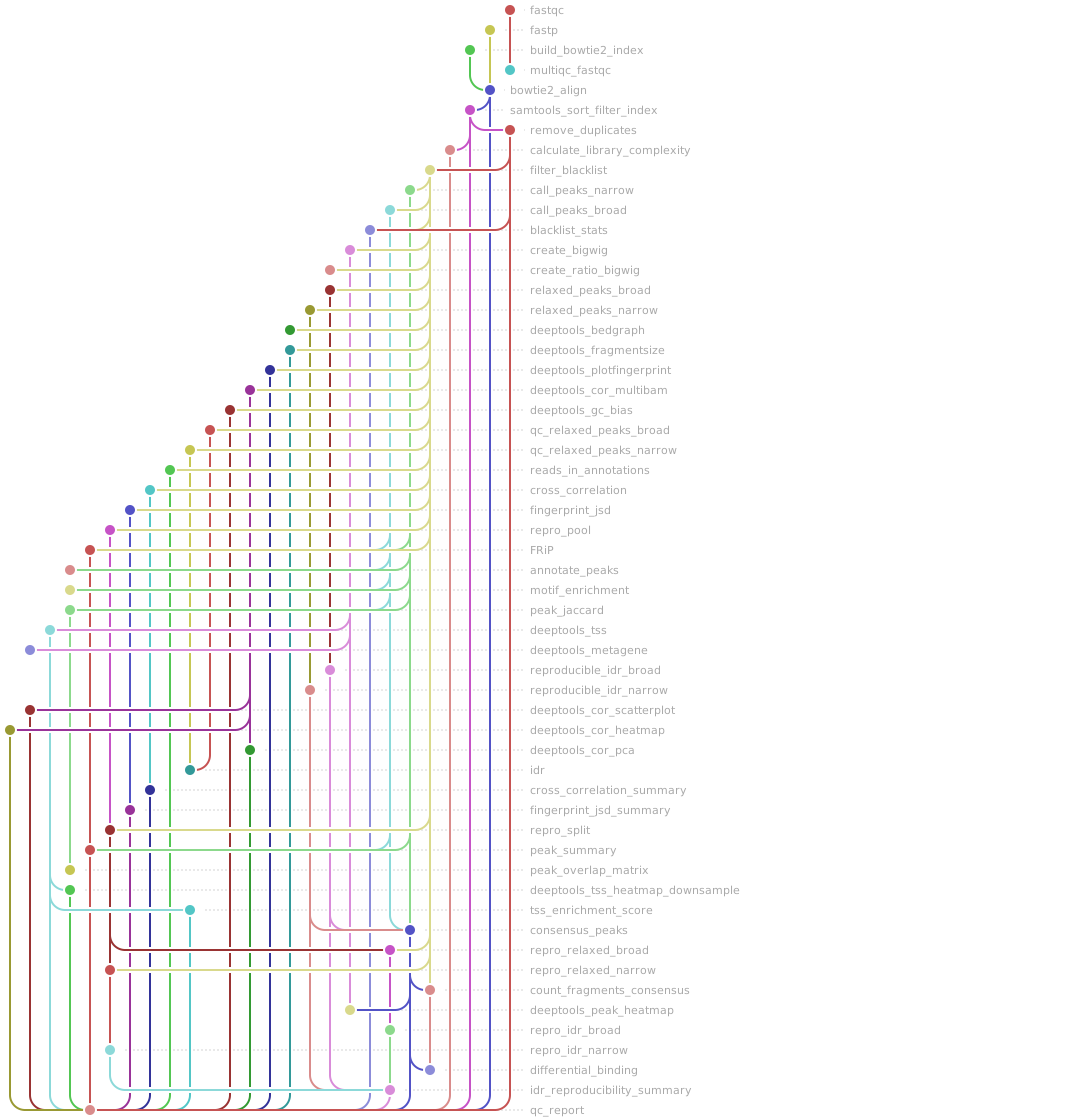
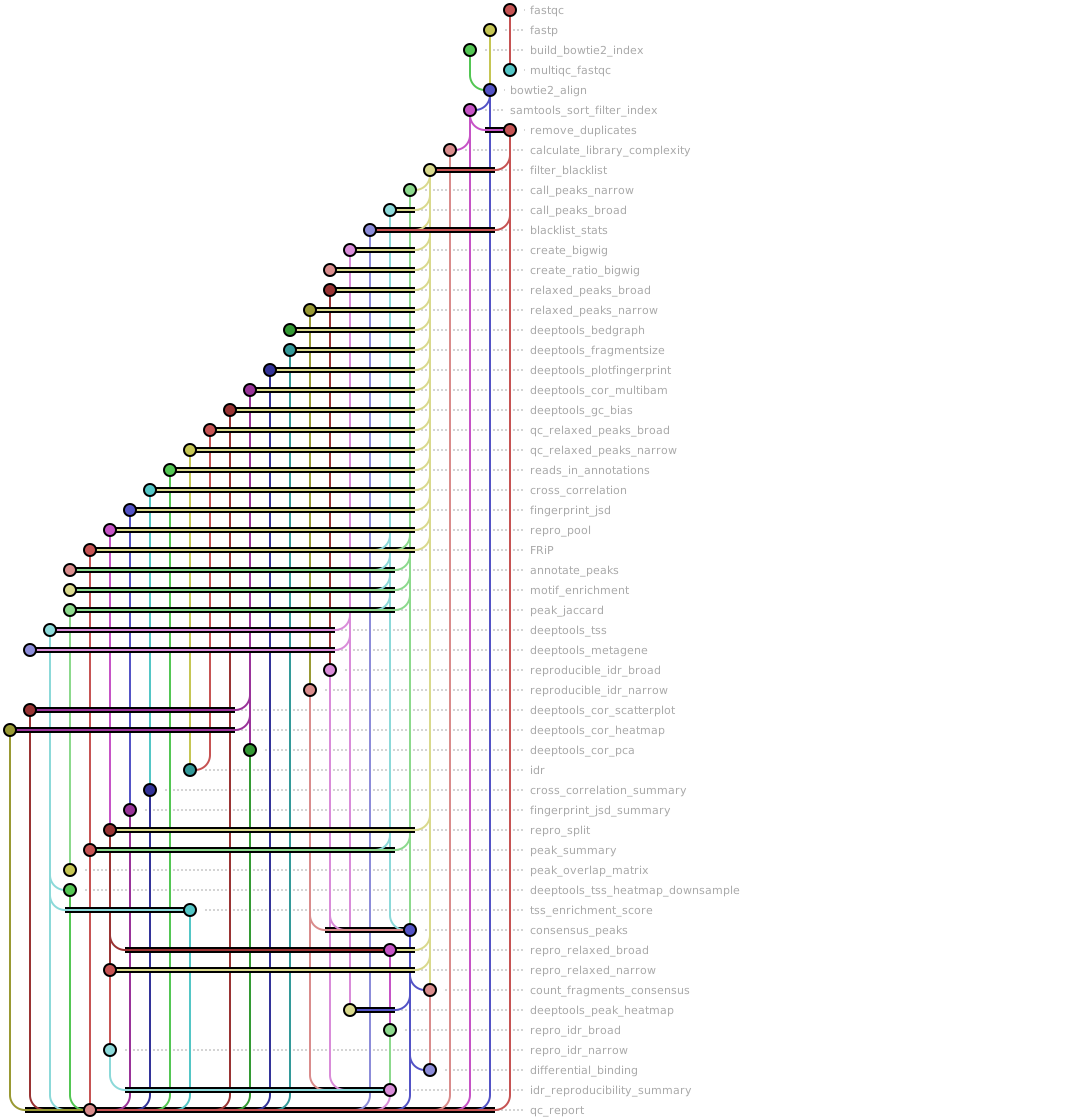
Workflow Rule Graph
This visualization of the workflow’s rule graph was automatically generated using Snakevision
Deployment
Step 1: Install Snakemake and Snakedeploy
Snakemake and Snakedeploy are best installed via the Conda package manager. It is recommended to install conda via Miniforge. Run
conda create -c conda-forge -c bioconda -c nodefaults --name snakemake snakemake snakedeploy
to install both Snakemake and Snakedeploy in an isolated environment. For all following commands ensure that this environment is activated via
conda activate snakemake
For other installation methods, refer to the Snakemake and Snakedeploy documentation.
Step 2: Deploy workflow
With Snakemake and Snakedeploy installed, the workflow can be deployed as follows. First, create an appropriate project working directory on your system and enter it:
mkdir -p path/to/project-workdir
cd path/to/project-workdir
In all following steps, we will assume that you are inside of that directory. Then run
snakedeploy deploy-workflow https://github.com/gynecoloji/snakemake_ChIPseq . --tag v0.2.0
Snakedeploy will create two folders, workflow and config. The former contains the deployment of the chosen workflow as a Snakemake module, the latter contains configuration files which will be modified in the next step in order to configure the workflow to your needs.
Step 3: Configure workflow
To configure the workflow, adapt config/config.yml to your needs following the instructions below.
Step 4: Run workflow
The deployment method is controlled using the --software-deployment-method (short --sdm) argument.
To run the workflow using apptainer/singularity, use
snakemake --cores all --sdm apptainer
To run the workflow using a combination of conda and apptainer/singularity for software deployment, use
snakemake --cores all --sdm conda apptainer
To run the workflow with automatic deployment of all required software via conda/mamba, use
snakemake --cores all --sdm conda
Snakemake will automatically detect the main Snakefile in the workflow subfolder and execute the workflow module that has been defined by the deployment in step 2.
For further options such as cluster and cloud execution, see the docs.
Step 5: Generate report
After finalizing your data analysis, you can automatically generate an interactive visual HTML report for inspection of results together with parameters and code inside of the browser using
snakemake --report report.zip
Configuration
The following section is imported from the workflow’s config/README.md.
Configuration
This workflow is configured through two files in this directory:
config.yaml— all workflow parameters (see below)samples.csv— the sample sheet
plus reference data you download into ref/ (not tracked in git; see
Reference data).
Sample sheet (config/samples.csv)
CSV with one row per sample and these columns:
column |
description |
|---|---|
|
Sample name. Raw reads must be |
|
IP target / biological condition label. All IP rows that share a |
|
Replicate index within the condition (1, 2, …). |
|
|
|
|
|
|
|
Free text. |
The choice between IgG and Input as the control is made once for the run with
the control_type parameter in config.yaml (input by default, or igg); see
Choosing the control below.
Example (the shipped sheet — OVCAR3 cJUN/IgG ChIP with matched inputs; each cJUN IP lists both its Input and its IgG control):
sample_id,condition,replicate,input_control,igg_control,peak_mode,notes
GSF2801-ChIPseq-OVCAR3-Control-Input_S3,Input,1,,,,Control input (control-only)
GSF2801-ChIPseq-OVCAR3-Control-IP-cJun_S1,Ctrl_cJUN,1,GSF2801-ChIPseq-OVCAR3-Control-Input_S3,GSF2801-ChIPseq-OVCAR3-Control-IP-IgG_S2,narrow,Control cJUN
GSF2801-ChIPseq-OVCAR3-Control-IP-IgG_S2,Ctrl_IgG,1,GSF2801-ChIPseq-OVCAR3-Control-Input_S3,,narrow,Control IgG
GSF2801-ChIPseq-OVCAR3-3D-Input_S6,Input,1,,,,3D input (control-only)
GSF2801-ChIPseq-OVCAR3-3D-IP-cJun_S4,3D_cJUN,1,GSF2801-ChIPseq-OVCAR3-3D-Input_S6,GSF2801-ChIPseq-OVCAR3-3D-IP-IgG_S5,narrow,3D cJUN
GSF2801-ChIPseq-OVCAR3-3D-IP-IgG_S5,3D_IgG,1,GSF2801-ChIPseq-OVCAR3-3D-Input_S6,,narrow,3D IgG
How the columns drive the pipeline:
Peak mode is per sample. Set
peak_modetobroadfor broad marks (e.g. H3K27me3, H3K9me3, H3K36me3) andnarrowfor point-source factors and sharp marks (e.g. transcription factors, H3K4me3). Every IP row can choose independently — MACS2 runs--broad --broad-cutofffor broad rows.Both controls are per sample. List each IP’s matched Input in
input_controland its matched IgG inigg_control(either may be empty). Which one MACS2 actually uses as-cis selected run-wide bycontrol_type(see below).Control-only samples (empty
peak_mode, e.g. Input, or an IgG you only use as a control) are still aligned, deduplicated and turned into bigWigs, and can be named as another sample’sinput_control/igg_control, but they are never peak-called and never enter the consensus.
Choosing the control (IgG vs. Input)
control_type in config.yaml picks which control each IP uses as its MACS2 -c,
for the whole run:
control_type: "input" # "input" (default) or "igg"
input(default) → each IP uses itsinput_control.igg→ each IP uses itsigg_control.Fallback: if the selected column is empty for a sample, the other column is used; if both are empty, that IP is called treatment-only (no
-c).
So to compare Input- vs. IgG-based calls, keep both columns filled in samples.csv
and just flip control_type (or override per run without editing the file:
snakemake ... --config control_type=igg). The IP-over-control log2 ratio bigWig
(results/ratio_bigwig/) uses the same resolved control.
Per-condition reproducibility is derived automatically from the number of IP
replicates sharing a condition:
≥ 3 replicates → majority vote (a peak is kept if it recurs in ≥
consensus_min_replicatesreplicates).exactly 2 replicates → IDR (
idr_threshold).1 replicate → the sample’s own peaks are used as-is.
All replicates of a condition must share one peak_mode (validated on load) so
the per-group consensus/IDR is well-defined. If a single ChIP target spans several
biological conditions, give each condition a distinct condition name (e.g.
Ctrl_cJUN vs 3D_cJUN, as above) so replicates group correctly.
Differential-binding contrasts
The downstream stage runs DESeq2 over the consensus count matrix for each contrast
listed under contrasts: in config.yaml. Each entry names two condition values
from the sample sheet (A = test, B = reference; log2FC > 0 means higher in A):
contrasts:
  - name: cJUN_3D_vs_Ctrl
    condition_a: "3D_cJUN"
    condition_b: "Ctrl_cJUN"
Leave the list empty (contrasts: []) to skip differential binding. A contrast
runs only if both conditions have ≥2 replicates — DESeq2 needs replicates to
estimate dispersion, so single-replicate (1-vs-1) contrasts are automatically
skipped with a warning rather than producing unreliable statistics. The shipped
OVCAR3 example has one replicate per condition, so contrasts is empty there. The
other downstream analyses (peak annotation + GO, motif enrichment, peak overlap,
signal heatmaps) run regardless of replicate count and need no configuration.
Parameters (config/config.yaml)
Every parameter — with its type, default, and description — is defined once in the
config schema, workflow/schemas/config.schema.yaml.
That schema is the single source of truth: the workflow validates config.yaml
against it on every run (and fills in defaults for anything you omit), and the
Snakemake Workflow Catalog
renders it as a parameter table on the workflow page.
To configure a run, edit config.yaml directly — it ships with working defaults
and an inline comment on every parameter. At minimum, point the reference-file
paths (human_fasta, blacklist, gtf, promoter_bed, enhancer_bed) at the
files you provide (see Reference data). Peak mode and the input
control are set per sample in samples.csv, not here; config.yaml holds only
the shared MACS2 parameters (macs2_genome, macs2_qvalue, broad_cutoff).
Reference data
Genomes, indexes and large annotations are not shipped in the repo (they are
.gitignored). Download / place them under ref/ before running, matching the
paths in config.yaml:
ref/hg38.fa— chr-prefixed UCSC human genomeref/hg38_blacklist_regions.bed— ENCODE hg38 blacklist (shipped)ref/gencode.v36.annotation.gtf— GENCODE annotation (for TSS QC)ref/hg38.2bit— forcomputeGCBiasref/picard.jar— Picard (used by MarkDuplicates)
The human Bowtie2 index (ref/BOWTIE2/) is built automatically by the
build_bowtie2_index rule from human_fasta.
See the top-level README.md for full setup and run instructions.
Workflow parameters
The following table is automatically parsed from the workflow’s config.schema.y(a)ml file.
Parameter |
Type |
Description |
Required |
Default |
|---|---|---|---|---|
samples_table |
string |
Path to the sample sheet CSV. Columns: sample_id, condition, replicate, input_control, igg_control, peak_mode, notes. peak_mode (narrow/broad) and the matched Input and IgG controls are set per sample; per-condition reproducibility (majority vote / IDR / single) is derived from the replicate count. |
yes |
config/samples.csv |
control_type |
string |
Which control each IP sample uses as the MACS2 -c control: ‘input’ (the default) uses the sample’s input_control, ‘igg’ uses its igg_control. If the selected column is empty for a sample, the other is used as a fallback; if both are empty, peaks are called treatment-only. |
yes |
input |
adapter_r1 |
string |
Optional. Explicit R1 adapter sequence that OVERRIDES fastp auto-detection. Leave unset to auto-detect adapters for paired-end reads (–detect_adapter_for_pe). |
||
adapter_r2 |
string |
Optional. Explicit R2 adapter sequence (used together with adapter_r1). |
||
human_fasta |
string |
Human genome FASTA. Must be chr-prefixed UCSC (chr1..chrX) to match the blacklist. |
yes |
ref/hg38.fa |
bowtie2_index |
string |
Bowtie2 index prefix for the human reference (created automatically by the build_bowtie2_index rule from human_fasta, optionally subset to align_chroms). |
yes |
ref/BOWTIE2/genome |
align_chroms |
array |
Human chromosomes kept when building the index (reads then align only to these). Use an empty list to keep all human chromosomes. |
yes |
|
keep_chroms |
array |
Analysis keep-set for the final BAM (mito-% QC is recorded first). Must be a subset of align_chroms and consistent with keep_chroms_regex. |
yes |
|
blacklist |
string |
ENCODE-style blacklist BED (chr-prefixed). |
yes |
ref/hg38_blacklist_regions.bed |
macs2_genome |
string |
MACS2 -g effective genome preset (e.g. hs, mm, ce, dm). |
yes |
hs |
macs2_qvalue |
number |
MACS2 -q FDR cutoff for the final peak calls (narrow and broad). |
yes |
0.05 |
broad_cutoff |
number |
MACS2 –broad-cutoff for broad-mode peak calls. |
yes |
0.1 |
effective_genome_size |
integer |
Effective genome size for deepTools RPGC normalization (hg38 default). |
yes |
2913022398 |
bin_size |
integer |
bigWig bin size in bp. |
yes |
25 |
consensus_window |
integer |
Fixed consensus peak width around each summit, in bp. |
yes |
500 |
consensus_min_replicates |
integer |
Majority-vote threshold for conditions with >=3 replicates. |
yes |
2 |
idr_threshold |
number |
IDR threshold for conditions with exactly 2 replicates. |
yes |
0.05 |
idr_relaxed_pvalue |
number |
MACS2 -p value for the relaxed peak calls used as IDR input. |
yes |
0.1 |
idr_top_n_peaks |
integer |
Number of top relaxed peaks retained per replicate for IDR. |
yes |
150000 |
keep_chroms_regex |
string |
Regex used by the consensus step to filter chromosomes; keep consistent with keep_chroms. |
yes |
^chr([1-9] |
contrasts |
array |
Differential-binding contrasts (DESeq2 over the consensus count matrix). Each entry names two conditions (from the sample sheet’s |
[] |
|
gtf |
string |
GENCODE GTF (chr-prefixed) used for TSS-signal QC. |
yes |
ref/gencode.v36.annotation.gtf |
promoter_bed |
string |
Promoter BED used for the reads-in-annotation QC. |
yes |
ref/promoter_chr1-22X.bed |
enhancer_bed |
string |
Enhancer BED used for the reads-in-annotation QC. |
yes |
ref/enhancer_chr1-22X.bed |
Linting and formatting
Linting results
  1No validator found for JSON Schema version identifier 'http://json-schema.org/draft-07/schema#'
  2Defaulting to validator for JSON Schema version 'https://json-schema.org/draft/2020-12/schema'
  3Note that schema file may not be validated correctly.
  4Lints for snakefile /tmp/tmpkk59ek6h/gynecoloji-snakemake_ChIPseq-f76f67b/workflow/rules/common.smk:
  5    * Mixed rules and functions in same snakefile.:
  6      Small one-liner functions used only once should be defined as lambda
  7      expressions. Other functions should be collected in a common module, e.g.
  8      'rules/common.smk'. This makes the workflow steps more readable.
  9      Also see:
 10      https://snakemake.readthedocs.io/en/latest/snakefiles/modularization.html#includes
 11
 12Lints for snakefile /tmp/tmpkk59ek6h/gynecoloji-snakemake_ChIPseq-f76f67b/workflow/rules/downstream.smk:
 13    * Mixed rules and functions in same snakefile.:
 14      Small one-liner functions used only once should be defined as lambda
 15      expressions. Other functions should be collected in a common module, e.g.
 16      'rules/common.smk'. This makes the workflow steps more readable.
 17      Also see:
 18      https://snakemake.readthedocs.io/en/latest/snakefiles/modularization.html#includes
 19
 20Lints for rule fastqc (line 52, /tmp/tmpkk59ek6h/gynecoloji-snakemake_ChIPseq-f76f67b/workflow/rules/chipseq.smk):
 21    * Param outdir is a prefix of input or output file but hardcoded:
 22      If this is meant to represent a file path prefix, it will fail when
 23      running workflow in environments without a shared filesystem. Instead,
 24      provide a function that infers the appropriate prefix from the input or
 25      output file, e.g.: lambda w, input: os.path.splitext(input[0])[0]
 26      Also see:
 27      https://snakemake.readthedocs.io/en/stable/snakefiles/rules.html#non-file-parameters-for-rules
 28      https://snakemake.readthedocs.io/en/stable/tutorial/advanced.html#tutorial-input-functions
 29
 30Lints for rule fastp (line 74, /tmp/tmpkk59ek6h/gynecoloji-snakemake_ChIPseq-f76f67b/workflow/rules/chipseq.smk):
 31    * Shell command directly uses variable FASTP_DIR from outside of the rule:
 32      It is recommended to pass all files as input and output, and non-file
 33      parameters via the params directive. Otherwise, provenance tracking is
 34      less accurate.
 35      Also see:
 36      https://snakemake.readthedocs.io/en/stable/snakefiles/rules.html#non-file-parameters-for-rules
 37
 38Lints for rule build_bowtie2_index (line 107, /tmp/tmpkk59ek6h/gynecoloji-snakemake_ChIPseq-f76f67b/workflow/rules/chipseq.smk):
 39    * Param index is a prefix of input or output file but hardcoded:
 40      If this is meant to represent a file path prefix, it will fail when
 41      running workflow in environments without a shared filesystem. Instead,
 42      provide a function that infers the appropriate prefix from the input or
 43      output file, e.g.: lambda w, input: os.path.splitext(input[0])[0]
 44      Also see:
 45      https://snakemake.readthedocs.io/en/stable/snakefiles/rules.html#non-file-parameters-for-rules
 46      https://snakemake.readthedocs.io/en/stable/tutorial/advanced.html#tutorial-input-functions
 47
 48Lints for rule bowtie2_align (line 138, /tmp/tmpkk59ek6h/gynecoloji-snakemake_ChIPseq-f76f67b/workflow/rules/chipseq.smk):
 49    * No log directive defined:
 50      Without a log directive, all output will be printed to the terminal. In
 51      distributed environments, this means that errors are harder to discover.
 52      In local environments, output of concurrent jobs will be mixed and become
 53      unreadable.
 54      Also see:
 55      https://snakemake.readthedocs.io/en/stable/snakefiles/rules.html#log-files
 56    * Shell command directly uses variable ALIGN_DIR from outside of the rule:
 57      It is recommended to pass all files as input and output, and non-file
 58      parameters via the params directive. Otherwise, provenance tracking is
 59      less accurate.
 60      Also see:
 61      https://snakemake.readthedocs.io/en/stable/snakefiles/rules.html#non-file-parameters-for-rules
 62    * Shell command directly uses variable TMP_DIR from outside of the rule:
 63      It is recommended to pass all files as input and output, and non-file
 64      parameters via the params directive. Otherwise, provenance tracking is
 65      less accurate.
 66      Also see:
 67      https://snakemake.readthedocs.io/en/stable/snakefiles/rules.html#non-file-parameters-for-rules
 68    * Shell command directly uses variable TMP_DIR from outside of the rule:
 69      It is recommended to pass all files as input and output, and non-file
 70      parameters via the params directive. Otherwise, provenance tracking is
 71      less accurate.
 72      Also see:
 73      https://snakemake.readthedocs.io/en/stable/snakefiles/rules.html#non-file-parameters-for-rules
 74    * Param index is a prefix of input or output file but hardcoded:
 75      If this is meant to represent a file path prefix, it will fail when
 76      running workflow in environments without a shared filesystem. Instead,
 77      provide a function that infers the appropriate prefix from the input or
 78      output file, e.g.: lambda w, input: os.path.splitext(input[0])[0]
 79      Also see:
 80      https://snakemake.readthedocs.io/en/stable/snakefiles/rules.html#non-file-parameters-for-rules
 81      https://snakemake.readthedocs.io/en/stable/tutorial/advanced.html#tutorial-input-functions
 82
 83Lints for rule samtools_sort_filter_index (line 167, /tmp/tmpkk59ek6h/gynecoloji-snakemake_ChIPseq-f76f67b/workflow/rules/chipseq.smk):
 84    * Shell command directly uses variable FILTERED_DIR from outside of the rule:
 85      It is recommended to pass all files as input and output, and non-file
 86      parameters via the params directive. Otherwise, provenance tracking is
 87      less accurate.
 88      Also see:
 89      https://snakemake.readthedocs.io/en/stable/snakefiles/rules.html#non-file-parameters-for-rules
 90    * Shell command directly uses variable TMP_DIR from outside of the rule:
 91      It is recommended to pass all files as input and output, and non-file
 92      parameters via the params directive. Otherwise, provenance tracking is
 93      less accurate.
 94      Also see:
 95      https://snakemake.readthedocs.io/en/stable/snakefiles/rules.html#non-file-parameters-for-rules
 96    * Shell command directly uses variable FILTERED_DIR from outside of the rule:
 97      It is recommended to pass all files as input and output, and non-file
 98      parameters via the params directive. Otherwise, provenance tracking is
 99      less accurate.
100      Also see:
101      https://snakemake.readthedocs.io/en/stable/snakefiles/rules.html#non-file-parameters-for-rules
102    * Shell command directly uses variable TMP_DIR from outside of the rule:
103      It is recommended to pass all files as input and output, and non-file
104      parameters via the params directive. Otherwise, provenance tracking is
105      less accurate.
106      Also see:
107      https://snakemake.readthedocs.io/en/stable/snakefiles/rules.html#non-file-parameters-for-rules
108    * Shell command directly uses variable TMP_DIR from outside of the rule:
109      It is recommended to pass all files as input and output, and non-file
110      parameters via the params directive. Otherwise, provenance tracking is
111      less accurate.
112      Also see:
113      https://snakemake.readthedocs.io/en/stable/snakefiles/rules.html#non-file-parameters-for-rules
114    * Shell command directly uses variable TMP_DIR from outside of the rule:
115      It is recommended to pass all files as input and output, and non-file
116      parameters via the params directive. Otherwise, provenance tracking is
117      less accurate.
118      Also see:
119      https://snakemake.readthedocs.io/en/stable/snakefiles/rules.html#non-file-parameters-for-rules
120    * Shell command directly uses variable TMP_DIR from outside of the rule:
121      It is recommended to pass all files as input and output, and non-file
122      parameters via the params directive. Otherwise, provenance tracking is
123      less accurate.
124      Also see:
125      https://snakemake.readthedocs.io/en/stable/snakefiles/rules.html#non-file-parameters-for-rules
126    * Shell command directly uses variable TMP_DIR from outside of the rule:
127      It is recommended to pass all files as input and output, and non-file
128      parameters via the params directive. Otherwise, provenance tracking is
129      less accurate.
130      Also see:
131      https://snakemake.readthedocs.io/en/stable/snakefiles/rules.html#non-file-parameters-for-rules
132    * Shell command directly uses variable TMP_DIR from outside of the rule:
133      It is recommended to pass all files as input and output, and non-file
134      parameters via the params directive. Otherwise, provenance tracking is
135      less accurate.
136      Also see:
137      https://snakemake.readthedocs.io/en/stable/snakefiles/rules.html#non-file-parameters-for-rules
138    * Shell command directly uses variable TMP_DIR from outside of the rule:
139      It is recommended to pass all files as input and output, and non-file
140      parameters via the params directive. Otherwise, provenance tracking is
141      less accurate.
142      Also see:
143      https://snakemake.readthedocs.io/en/stable/snakefiles/rules.html#non-file-parameters-for-rules
144    * Shell command directly uses variable TMP_DIR from outside of the rule:
145      It is recommended to pass all files as input and output, and non-file
146      parameters via the params directive. Otherwise, provenance tracking is
147      less accurate.
148      Also see:
149      https://snakemake.readthedocs.io/en/stable/snakefiles/rules.html#non-file-parameters-for-rules
150    * Shell command directly uses variable TMP_DIR from outside of the rule:
151      It is recommended to pass all files as input and output, and non-file
152      parameters via the params directive. Otherwise, provenance tracking is
153      less accurate.
154      Also see:
155      https://snakemake.readthedocs.io/en/stable/snakefiles/rules.html#non-file-parameters-for-rules
156
157Lints for rule remove_duplicates (line 222, /tmp/tmpkk59ek6h/gynecoloji-snakemake_ChIPseq-f76f67b/workflow/rules/chipseq.smk):
158    * Shell command directly uses variable DEDUP_DIR from outside of the rule:
159      It is recommended to pass all files as input and output, and non-file
160      parameters via the params directive. Otherwise, provenance tracking is
161      less accurate.
162      Also see:
163      https://snakemake.readthedocs.io/en/stable/snakefiles/rules.html#non-file-parameters-for-rules
164
165Lints for rule filter_blacklist (line 249, /tmp/tmpkk59ek6h/gynecoloji-snakemake_ChIPseq-f76f67b/workflow/rules/chipseq.smk):
166    * Shell command directly uses variable BLACKLIST_FILTERED_DIR from outside of the rule:
167      It is recommended to pass all files as input and output, and non-file
168      parameters via the params directive. Otherwise, provenance tracking is
169      less accurate.
170      Also see:
171      https://snakemake.readthedocs.io/en/stable/snakefiles/rules.html#non-file-parameters-for-rules
172    * Shell command directly uses variable TMP_DIR from outside of the rule:
173      It is recommended to pass all files as input and output, and non-file
174      parameters via the params directive. Otherwise, provenance tracking is
175      less accurate.
176      Also see:
177      https://snakemake.readthedocs.io/en/stable/snakefiles/rules.html#non-file-parameters-for-rules
178
179Lints for rule call_peaks_narrow (line 324, /tmp/tmpkk59ek6h/gynecoloji-snakemake_ChIPseq-f76f67b/workflow/rules/chipseq.smk):
180    * Param outdir is a prefix of input or output file but hardcoded:
181      If this is meant to represent a file path prefix, it will fail when
182      running workflow in environments without a shared filesystem. Instead,
183      provide a function that infers the appropriate prefix from the input or
184      output file, e.g.: lambda w, input: os.path.splitext(input[0])[0]
185      Also see:
186      https://snakemake.readthedocs.io/en/stable/snakefiles/rules.html#non-file-parameters-for-rules
187      https://snakemake.readthedocs.io/en/stable/tutorial/advanced.html#tutorial-input-functions
188
189Lints for rule call_peaks_broad (line 356, /tmp/tmpkk59ek6h/gynecoloji-snakemake_ChIPseq-f76f67b/workflow/rules/chipseq.smk):
190    * Param outdir is a prefix of input or output file but hardcoded:
191      If this is meant to represent a file path prefix, it will fail when
192      running workflow in environments without a shared filesystem. Instead,
193      provide a function that infers the appropriate prefix from the input or
194      output file, e.g.: lambda w, input: os.path.splitext(input[0])[0]
195      Also see:
196      https://snakemake.readthedocs.io/en/stable/snakefiles/rules.html#non-file-parameters-for-rules
197      https://snakemake.readthedocs.io/en/stable/tutorial/advanced.html#tutorial-input-functions
198
199Lints for rule create_bigwig (line 390, /tmp/tmpkk59ek6h/gynecoloji-snakemake_ChIPseq-f76f67b/workflow/rules/chipseq.smk):
200    * Shell command directly uses variable BIGWIG_DIR from outside of the rule:
201
202... (truncated)
Formatting results
 1[DEBUG]
 2[DEBUG] In file "/tmp/tmpkk59ek6h/gynecoloji-snakemake_ChIPseq-f76f67b/workflow/rules/chipseq.smk":  Formatted content is different from original
 3[DEBUG]
 4[DEBUG]
 5[DEBUG] In file "/tmp/tmpkk59ek6h/gynecoloji-snakemake_ChIPseq-f76f67b/workflow/rules/common.smk":  Formatted content is different from original
 6[DEBUG]
 7[DEBUG] In file "/tmp/tmpkk59ek6h/gynecoloji-snakemake_ChIPseq-f76f67b/workflow/rules/downstream.smk":  Formatted content is different from original
 8[DEBUG]
 9[DEBUG] In file "/tmp/tmpkk59ek6h/gynecoloji-snakemake_ChIPseq-f76f67b/workflow/rules/qc.smk":  Formatted content is different from original
10[INFO] 4 file(s) would be changed 😬
11[INFO] 1 file(s) would be left unchanged 🎉
12
13snakefmt version: 0.11.5