
gynecoloji/snakemake_debug


Containerized Snakemake workflow that diagnoses why short-read samples align poorly — contamination, vector/transgene, rRNA, adapter, and spike-in multimapping — and identifies the unaligned reads in a self-contained HTML report.
Overview
Latest release: v0.2.3, Last update: 2026-07-30
Share link: https://snakemake.github.io/snakemake-workflow-catalog?wf=gynecoloji/snakemake_debug
Quality control: linting: failed formatting: failed
Topics: alignement apptainer blast contamination-detection kraken2 ngs quality-control snakemake
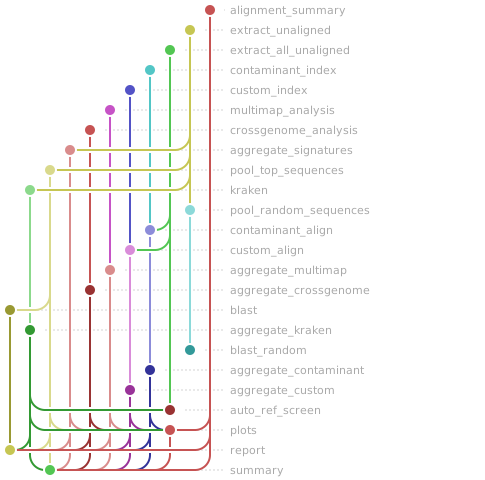
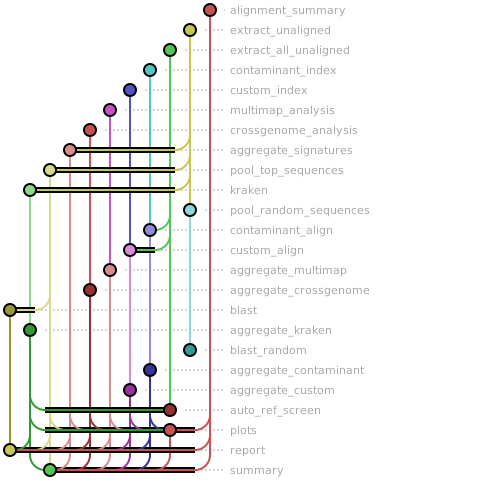
Workflow Rule Graph
This visualization of the workflow’s rule graph was automatically generated using Snakevision
Deployment
Step 1: Install Snakemake and Snakedeploy
Snakemake and Snakedeploy are best installed via the Conda package manager. It is recommended to install conda via Miniforge. Run
conda create -c conda-forge -c bioconda -c nodefaults --name snakemake snakemake snakedeploy
to install both Snakemake and Snakedeploy in an isolated environment. For all following commands ensure that this environment is activated via
conda activate snakemake
For other installation methods, refer to the Snakemake and Snakedeploy documentation.
Step 2: Deploy workflow
With Snakemake and Snakedeploy installed, the workflow can be deployed as follows. First, create an appropriate project working directory on your system and enter it:
mkdir -p path/to/project-workdir
cd path/to/project-workdir
In all following steps, we will assume that you are inside of that directory. Then run
snakedeploy deploy-workflow https://github.com/gynecoloji/snakemake_debug . --tag v0.2.3
Snakedeploy will create two folders, workflow and config. The former contains the deployment of the chosen workflow as a Snakemake module, the latter contains configuration files which will be modified in the next step in order to configure the workflow to your needs.
Step 3: Configure workflow
To configure the workflow, adapt config/config.yml to your needs following the instructions below.
Step 4: Run workflow
The deployment method is controlled using the --software-deployment-method (short --sdm) argument.
Snakemake will automatically detect the main Snakefile in the workflow subfolder and execute the workflow module that has been defined by the deployment in step 2.
For further options such as cluster and cloud execution, see the docs.
Step 5: Generate report
After finalizing your data analysis, you can automatically generate an interactive visual HTML report for inspection of results together with parameters and code inside of the browser using
snakemake --report report.zip
Configuration
The following section is imported from the workflow’s config/README.md.
Configuration
This workflow is configured through a single file in this directory:
config.yaml— all workflow parameters (validated at the start of every run againstworkflow/schemas/config.schema.yaml).
Unlike a sample-sheet workflow, samples are discovered automatically by
globbing input.align_dir for files ending in input.align_suffix — there is no
samples.csv. The part of each filename before the suffix becomes the sample
label used throughout the reports.
All relative paths resolve under project_dir unless they are absolute.
Input
Point input.align_dir at a directory of per-sample raw aligner output
(SAM/BAM that still contains the unmapped reads — not a post-filtered
unique-mapped BAM, which has the reads to diagnose removed):
<project_dir>/results/hisat2/     # <- input.align_dir
├── sampleA.sam                   # sample label = "sampleA"
├── sampleB.sam
└── sampleC.sam
input:
  align_dir:    "results/hisat2"  # relative to project_dir (or absolute)
  align_suffix: ".sam"            # ".sam" or ".bam" — must match your files
  unmapped_flag: 4                # SAM flag for unmapped reads (almost always 4)
Parameters
key |
meaning |
|---|---|
|
absolute path; all relative paths resolve against it |
|
raw aligner output dir, suffix, and the SAM unmapped flag |
|
where results go (under |
|
host organism name (reporting only) |
|
bound reads sampled / records scanned per file (sampled steps 02/03/04/06) |
|
Kraken2 DB dir — empty ⇒ skip step 06 |
|
suspect-genome FASTA — empty ⇒ skip step 05 |
|
custom construct/vector FASTA — empty ⇒ skip step 07 |
|
remote BLAST of the top (03) and random (04) unaligned reads (login node) |
|
step 08 — auto-pick the top non-host organism and align to its RefSeq genome (login node) |
|
step 09 — multimapped-read investigation (spike-in only; requires |
|
cores per multi-threaded rule |
Optional steps switch off when their path/flag is left empty. See the
top-level README.md for the full narrative and the two-phase
(login-node setup / compute-node run) usage, and
workflow/documentation.md for the per-step
technical reference.
Running
# dry run (see the DAG without executing)
apptainer exec containers/debug_tools.sif \
    snakemake -s workflow/Snakefile --configfile config/config.yaml -n

# full run
apptainer exec --cleanenv -B "$PWD" -B <project_dir> containers/debug_tools.sif \
    snakemake -s workflow/Snakefile --configfile config/config.yaml --cores 8
Run a subset with a stage aggregator target: unaligned_all, blast_all
(login node), screens_all, multimap_all, or report_all.
Workflow parameters
The following table is automatically parsed from the workflow’s config.schema.y(a)ml file.
Parameter |
Type |
Description |
Required |
Default |
|---|---|---|---|---|
project_dir |
string |
Absolute path to your project. All relative paths below resolve under it. |
yes |
|
input |
Per-sample RAW aligner output (SAM/BAM that still contains unmapped reads). |
yes |
||
. align_dir |
string |
Directory of raw aligner output (HISAT2/STAR/bwa), NOT a post-filtered unique BAM. |
yes |
|
. align_suffix |
string |
File suffix selecting the aligned files (“.sam” or “.bam”). |
yes |
|
. unmapped_flag |
integer |
SAM flag selecting unmapped reads (typically 4). |
yes |
|
output_dir |
string |
Results directory (relative to project_dir, or absolute). |
yes |
|
host_label |
string |
Host organism name — used for reporting only. |
yes |
|
sampling |
Caps that bound the sampled steps (02 motif, 03/04 BLAST, 06 Kraken2). |
yes |
||
. unmapped_cap |
integer |
Max unaligned reads sampled per file (sampled steps only). |
yes |
|
. records_cap |
integer |
Max alignment records scanned per file (bounds I/O). |
yes |
|
kraken |
Kraken2 taxonomic classification (step 06). |
yes |
||
. db |
string |
Kraken2 DB directory. Empty string -> skip step 06. |
yes |
|
contaminant |
Suspect-genome screen (step 05). |
yes |
||
. reference_fasta |
string |
Local FASTA of the suspect genome. Empty string -> skip step 05. |
yes |
|
custom |
Optional custom-construct screen (step 07). |
|||
. fasta |
string |
Custom FASTA (transgene / vector / construct). Empty string -> skip step 07. |
||
blast |
Remote BLAST of the top and random unaligned sequences (steps 03/04; login node). |
yes |
||
. enabled |
boolean |
BLAST the most-duplicated unaligned sequences (step 03). |
yes |
|
. random |
boolean |
Also BLAST random unaligned reads (step 04) to catch species Kraken2/motifs miss. |
||
. n_random |
integer |
Random reads sampled per sample for the random BLAST. |
||
. db |
string |
BLAST database name (e.g. “nt”). |
||
. max_target_seqs |
integer |
blastn -max_target_seqs. |
||
auto_ref |
Auto-pick the top non-host organism and align to its RefSeq genome (step 08; login node). |
|||
. enabled |
boolean |
Add step 08 to the default target. |
||
. min_fraction |
number |
Minimum support (fraction of classified/BLAST reads) to accept an organism. |
||
multimap |
Multimapped-read investigation (step 09) — SPIKE-IN SEQUENCING ONLY. Requires enabled AND spikein. Needs the pre-filter alignment to a combined host+spike-in genome. |
|||
. enabled |
boolean |
Add step 09 (spike-in only; you must also set spikein true). |
||
. spikein |
boolean |
Reads were aligned to a combined host+spike-in genome (required for step 09). |
||
. spikein_prefix |
string |
Contigs starting with this prefix belong to the spike-in genome. |
||
. method |
string |
Multimap-detection method. |
||
. xs_strict |
boolean |
xs method — require XS == AS (an equally-best second hit) rather than any XS. |
||
. mapq_max |
integer |
mapq method / fallback — MAPQ <= this counts as multimapped. |
||
. align_dir |
string |
Raw combined host+spike-in alignment dir. Empty -> inherit input.align_dir. |
||
. align_suffix |
string |
Suffix for the combined alignment. Empty -> inherit input.align_suffix. |
||
. cross_genome |
boolean |
Enable the both-genomes check (needs host_index and spikein_index). |
||
. host_index |
string |
bowtie2 index basename, host only. |
||
. spikein_index |
string |
bowtie2 index basename, spike-in only. |
||
. cross_fraction |
number |
1.0 = ALL multimapped reads; < 1 samples that fraction. |
||
. cross_cap |
integer |
0 = no cap; > 0 caps sampled reads per file. |
||
. cross_seed |
integer |
Sampling seed (used when cross_fraction < 1 or cross_cap > 0). |
||
. cross_codominant_margin |
integer |
A read is “codominant” when |
host AS - spike-in AS |
<= this (equally-good = ambiguous). |
threads |
integer |
Threads per multi-threaded rule. |
yes |
Linting and formatting
Linting results
1No validator found for JSON Schema version identifier 'http://json-schema.org/draft-07/schema#'
2Defaulting to validator for JSON Schema version 'https://json-schema.org/draft/2020-12/schema'
3Note that schema file may not be validated correctly.
4WorkflowError in file "/tmp/tmptxf3f4tm/gynecoloji-snakemake_debug-e62508d/workflow/rules/common.smk", line 76:
5No '.sam' files found in /path/to/your/project/results/hisat2
6  File "/tmp/tmptxf3f4tm/gynecoloji-snakemake_debug-e62508d/workflow/rules/common.smk", line 76, in <module>
Formatting results
 1[DEBUG]
 2[DEBUG] In file "/tmp/tmptxf3f4tm/gynecoloji-snakemake_debug-e62508d/workflow/rules/blast.smk":  Formatted content is different from original
 3[DEBUG]
 4[DEBUG] In file "/tmp/tmptxf3f4tm/gynecoloji-snakemake_debug-e62508d/workflow/rules/unaligned.smk":  Formatted content is different from original
 5[DEBUG]
 6[DEBUG]
 7[DEBUG] In file "/tmp/tmptxf3f4tm/gynecoloji-snakemake_debug-e62508d/workflow/rules/report.smk":  Formatted content is different from original
 8[DEBUG]
 9[DEBUG] In file "/tmp/tmptxf3f4tm/gynecoloji-snakemake_debug-e62508d/workflow/rules/multimap.smk":  Formatted content is different from original
10[DEBUG]
11[DEBUG] In file "/tmp/tmptxf3f4tm/gynecoloji-snakemake_debug-e62508d/workflow/rules/screens.smk":  Formatted content is different from original
12[DEBUG]
13[DEBUG] In file "/tmp/tmptxf3f4tm/gynecoloji-snakemake_debug-e62508d/workflow/rules/common.smk":  Formatted content is different from original
14[INFO] 6 file(s) would be changed 😬
15[INFO] 1 file(s) would be left unchanged 🎉
16
17snakefmt version: 0.11.5