
gynecoloji/snakemake_scstseq


None
Overview
Latest release: v0.3.0, Last update: 2026-09-09
Share link: https://snakemake.github.io/snakemake-workflow-catalog?wf=gynecoloji/snakemake_scstseq
Quality control: linting: failed formatting: passed
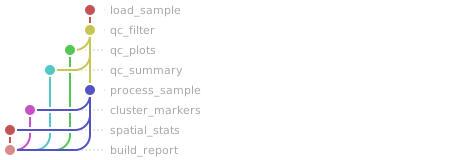
Workflow Rule Graph
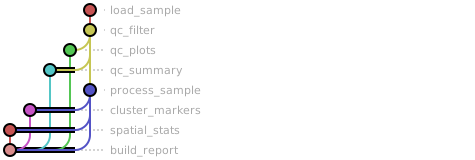
This visualization of the workflow’s rule graph was automatically generated using Snakevision
Deployment
Step 1: Install Snakemake and Snakedeploy
Snakemake and Snakedeploy are best installed via the Conda package manager. It is recommended to install conda via Miniforge. Run
conda create -c conda-forge -c bioconda -c nodefaults --name snakemake snakemake snakedeploy
to install both Snakemake and Snakedeploy in an isolated environment. For all following commands ensure that this environment is activated via
conda activate snakemake
For other installation methods, refer to the Snakemake and Snakedeploy documentation.
Step 2: Deploy workflow
With Snakemake and Snakedeploy installed, the workflow can be deployed as follows. First, create an appropriate project working directory on your system and enter it:
mkdir -p path/to/project-workdir
cd path/to/project-workdir
In all following steps, we will assume that you are inside of that directory. Then run
snakedeploy deploy-workflow https://github.com/gynecoloji/snakemake_scstseq . --tag v0.3.0
Snakedeploy will create two folders, workflow and config. The former contains the deployment of the chosen workflow as a Snakemake module, the latter contains configuration files which will be modified in the next step in order to configure the workflow to your needs.
Step 3: Configure workflow
To configure the workflow, adapt config/config.yml to your needs following the instructions below.
Step 4: Run workflow
The deployment method is controlled using the --software-deployment-method (short --sdm) argument.
To run the workflow using apptainer/singularity, use
snakemake --cores all --sdm apptainer
To run the workflow using a combination of conda and apptainer/singularity for software deployment, use
snakemake --cores all --sdm conda apptainer
To run the workflow with automatic deployment of all required software via conda/mamba, use
snakemake --cores all --sdm conda
Snakemake will automatically detect the main Snakefile in the workflow subfolder and execute the workflow module that has been defined by the deployment in step 2.
For further options such as cluster and cloud execution, see the docs.
Step 5: Generate report
After finalizing your data analysis, you can automatically generate an interactive visual HTML report for inspection of results together with parameters and code inside of the browser using
snakemake --report report.zip
Configuration
The following section is imported from the workflow’s config/README.md.
Configuration
This workflow is configured through two files in this directory:
config.yaml— all workflow parameters (nested by section)samples.csv— the sample sheet
plus the per-sample vendor output directories you place under data/.
Sample sheet (config/samples.csv)
CSV with one row per tissue section:
column |
required |
description |
|---|---|---|
|
yes |
Section name; used in every output path and as the barcode prefix. Must be unique. |
|
yes |
|
|
yes |
The vendor output directory (see below). Relative to |
|
no |
Free-text group label, carried into the QC summary and report (reserved for future comparative stages). |
Example:
sample_id,platform,path,condition
xenium_tumor_1,xenium,xenium_tumor_1/outs,tumor
visium_tumor_1,visium,visium_tumor_1/outs,tumor
visium_normal_1,visium,visium_normal_1/outs,normal
What each path must contain
platform |
files read from |
produced by |
|---|---|---|
|
|
Xenium Onboard Analysis |
|
|
Space Ranger |
Everything else in those directories (transcripts, boundaries, morphology
images, zarr stores) is ignored — nothing is copied, so you can point path
straight at the vendor directory. Missing required files fail at DAG-build
time with the missing path named.
Xenium control features (negative-control probes/codewords, unassigned
and genomic controls) are counted per cell into control_counts /
control_frac and then removed from the gene matrix. Visium spots outside
the tissue (in_tissue == 0) are dropped at load time.
Parameters (config/config.yaml)
Every parameter — type, default, description — is defined in the config schema,
workflow/schemas/config.schema.yaml.
The workflow validates config.yaml against it on every run (and fills in
defaults for anything omitted), and the Snakemake Workflow Catalog renders it as
a parameter table. config.yaml ships with working defaults and an inline
comment on each parameter.
Highlights:
genome.*_pattern— gene-name regexes for the mito / ribo / hemoglobin QC subsets (defaults are human; switch to^mt-/^Rp[sl]/^Hb[^p]for mouse).qc.xenium.*/qc.visium.*— cell/spot thresholds per platform; every threshold uses0= disabled. Cells are dropped by the first failing rule, and that reason is recorded.processing.xenium/processing.visium— normalization target, HVG selection, scaling, PCs, neighbours, Leiden resolution.spatial.xenium/spatial.visium— how the spatial neighbours graph is built (kNN / Delaunay / radius for cells; hexagonal grid rings for spots);spatial.nhood_enrichment.n_permsandspatial.moran.*control the permutation tests.imputation.*— the opt-inimpute_allstage:methods(any ofmagic,alra,scvi; one output set each),genes(hvgwith a fallback to all genes on targeted panels, orall), and one parameter block per method (magic.{knn,t,n_pca,decay},alra.{k,k_max,quantile},scvi.{n_latent,n_layers,n_hidden,max_epochs,library_size,gpu}).report.enabled— build the self-contained HTML report as part ofall.threads.*— threads per rule.
Workflow parameters
The following table is automatically parsed from the workflow’s config.schema.y(a)ml file.
Parameter |
Type |
Description |
Required |
Default |
|---|---|---|---|---|
samples_table |
string |
Path to the sample sheet CSV (columns sample_id, platform, path, optional condition). |
yes |
config/samples.csv |
paths |
Input/output directory layout. |
yes |
||
. data_dir |
string |
Directory holding the per-sample vendor output directories. |
yes |
data |
. results_dir |
string |
Directory for all pipeline outputs. |
yes |
results |
. logs_dir |
string |
Directory for all per-rule logs. |
yes |
logs |
genome |
Species metadata and the gene-name regexes used for the QC subsets. |
yes |
||
. species |
string |
Homo_sapiens |
||
. mito_pattern |
string |
Regex on gene names marking mitochondrial genes (mouse: ^mt-). |
yes |
^MT- |
. ribo_pattern |
string |
Regex on gene names marking ribosomal-protein genes (mouse: ^Rp[sl]). |
yes |
^RP[SL] |
. hb_pattern |
string |
Regex on gene names marking hemoglobin genes (mouse: ^Hb[^p]). |
yes |
^HB[^P] |
qc |
Cell/spot filtering thresholds per platform. Every threshold uses 0 = disabled; a cell is dropped by the first rule it fails. |
yes |
||
. xenium |
Thresholds for Xenium cells (counts are transcripts per cell). |
yes |
||
. . min_counts |
number |
Minimum transcripts per cell. |
yes |
10 |
. . max_counts |
number |
Maximum transcripts per cell (0 = no cap). |
yes |
0 |
. . min_genes |
integer |
Minimum detected genes per cell. |
yes |
5 |
. . min_area |
number |
Minimum cell area in µm² (0 = off). |
yes |
0 |
. . max_area |
number |
Maximum cell area in µm² (0 = off). |
yes |
0 |
. . max_control_frac |
number |
Maximum fraction of control-probe/codeword counts per cell (0 = off). |
yes |
0 |
. . min_cells |
integer |
Keep genes detected in at least this many kept cells. |
yes |
5 |
. visium |
Thresholds for Visium spots (counts are UMIs per spot). |
yes |
||
. . min_counts |
number |
Minimum UMIs per spot. |
yes |
500 |
. . max_counts |
number |
Maximum UMIs per spot (0 = no cap). |
yes |
0 |
. . min_genes |
integer |
Minimum detected genes per spot. |
yes |
250 |
. . max_pct_mt |
number |
Maximum percent mitochondrial UMIs per spot (0 = off). |
yes |
30 |
. . max_pct_hb |
number |
Maximum percent hemoglobin UMIs per spot (0 = off). |
yes |
0 |
. . min_cells |
integer |
Keep genes detected in at least this many kept spots. |
yes |
10 |
processing |
Normalization, dimensionality reduction and clustering, per platform. |
yes |
||
. xenium |
Processing of Xenium cells (targeted panel — every gene is used by default). |
yes |
||
. . target_sum |
number |
normalize_total target per cell (0 = median of the totals). |
yes |
100 |
. . hvg |
boolean |
Select highly variable genes (seurat_v3 on counts) before PCA. |
yes |
false |
. . n_top_genes |
integer |
Number of HVGs when hvg is true. |
yes |
0 |
. . scale |
boolean |
z-score genes (clipped at 10) before PCA. |
yes |
false |
. . n_pcs |
integer |
Principal components (capped at n_genes - 1). |
yes |
30 |
. . n_neighbors |
integer |
kNN graph size for Leiden/UMAP. |
yes |
15 |
. . resolution |
number |
Leiden resolution. |
yes |
0.5 |
. visium |
Processing of Visium spots (whole transcriptome — HVGs are selected by default). |
yes |
||
. . target_sum |
number |
normalize_total target per spot (0 = median of the totals). |
yes |
0 |
. . hvg |
boolean |
Select highly variable genes (seurat_v3 on counts) before PCA. |
yes |
true |
. . n_top_genes |
integer |
Number of HVGs when hvg is true. |
yes |
2000 |
. . scale |
boolean |
z-score genes (clipped at 10) before PCA. |
yes |
true |
. . n_pcs |
integer |
Principal components (capped at n_genes - 1). |
yes |
30 |
. . n_neighbors |
integer |
kNN graph size for Leiden/UMAP. |
yes |
15 |
. . resolution |
number |
Leiden resolution. |
yes |
0.5 |
. markers |
Per-cluster marker-gene detection (scanpy rank_genes_groups). |
yes |
||
. . method |
string |
yes |
wilcoxon |
|
. . n_top |
integer |
Markers reported per cluster. |
yes |
25 |
. seed |
integer |
Random seed for PCA/neighbours/Leiden/UMAP. |
yes |
0 |
spatial |
Spatial neighbours graph and statistics (squidpy). |
yes |
||
. xenium |
Graph construction for Xenium cells (generic coordinates in µm). |
yes |
||
. . coord_type |
string |
yes |
generic |
|
. . n_neighs |
integer |
k nearest neighbours (ignored when radius > 0 or delaunay is true). |
yes |
10 |
. . delaunay |
boolean |
Use a Delaunay triangulation instead of kNN. |
yes |
false |
. . radius |
number |
Connect every cell within this distance in µm (0 = off). |
yes |
0 |
. visium |
Graph construction for Visium spots (hexagonal grid). |
yes |
||
. . coord_type |
string |
yes |
grid |
|
. . n_neighs |
integer |
Neighbours per ring: 6 for the Visium hex grid, 4 or 8 for square bins. |
yes |
6 |
. . n_rings |
integer |
Rings of neighbours to connect. |
yes |
1 |
. nhood_enrichment |
yes |
|||
. . n_perms |
integer |
Permutations for the cluster neighborhood-enrichment z-scores. |
yes |
1000 |
. moran |
yes |
|||
. . n_perms |
integer |
Permutations for Moran’s I p-values (0 = analytic p-values only). |
yes |
100 |
. . n_top |
integer |
Spatially variable genes listed in the report. |
yes |
50 |
. . plot_top |
integer |
Top SVGs drawn on the section (0 = no plot panels). |
yes |
6 |
imputation |
Opt-in imputation of the measured genes ( |
yes |
||
. methods |
array |
Methods to run: magic (kNN diffusion), alra (low-rank approximation), scvi (scvi-tools; own conda env). Empty list disables the stage. |
yes |
[‘magic’, ‘alra’] |
. genes |
string |
Impute the highly variable genes only (falls back to all genes when none were selected, i.e. Xenium) or every gene. |
yes |
hvg |
. plot_top |
integer |
Top spatially variable genes drawn observed vs imputed (0 = no panels). |
yes |
6 |
. magic |
yes |
|||
. . knn |
integer |
Neighbours per cell for the diffusion graph. |
yes |
5 |
. . t |
integer |
Diffusion time; higher smooths more. |
yes |
3 |
. . n_pca |
integer |
PCs the graph is built on (capped at n_genes - 1; skipped when the panel has <= 100 genes). |
yes |
100 |
. . decay |
number |
Alpha-decay kernel exponent. |
yes |
1 |
. alra |
yes |
|||
. . k |
integer |
Rank of the approximation; 0 = chosen from the singular-value noise floor. |
yes |
0 |
. . k_max |
integer |
Largest rank considered when k = 0. |
yes |
100 |
. . quantile |
number |
Per-gene thresholding quantile (ALRA default 0.001). |
yes |
0.001 |
. scvi |
yes |
|||
. . n_latent |
integer |
yes |
10 |
|
. . n_layers |
integer |
yes |
1 |
|
. . n_hidden |
integer |
yes |
128 |
|
. . max_epochs |
integer |
Training epochs; 0 = the scvi-tools heuristic from the number of cells. |
yes |
0 |
. . library_size |
number |
Imputed counts per cell before log1p; 0 = the platform’s target_sum, else the median observed depth. |
yes |
0 |
. . gpu |
boolean |
Train in the CUDA env (py-scvi-gpu); needs the GPU container or a GPU node. |
yes |
false |
report |
yes |
|||
. enabled |
boolean |
Build results/report/scstseq_report.html as part of the default target. |
yes |
true |
threads |
Threads per rule. |
yes |
||
. load_sample |
integer |
yes |
1 |
|
. qc_filter |
integer |
yes |
1 |
|
. qc_plots |
integer |
yes |
1 |
|
. qc_summary |
integer |
yes |
1 |
|
. process_sample |
integer |
yes |
4 |
|
. cluster_markers |
integer |
yes |
2 |
|
. spatial_stats |
integer |
yes |
4 |
|
. build_report |
integer |
yes |
1 |
|
. impute |
integer |
yes |
4 |
|
. impute_summary |
integer |
yes |
1 |
Linting and formatting
Linting results
 1/home/runner/work/snakemake-workflow-catalog/snakemake-workflow-catalog/.pixi/envs/default/lib/python3.13/site-packages/google/auth/transport/grpc.py:44: FutureWarning: grpcio < 1.83.0 does not support Post-Quantum Cryptography (PQC). Support for non-PQC environments is deprecated. In October 2026, google-auth will raise its minimum requirements to enforce grpcio >= 1.83.0. For more details on Google Cloud's post-quantum security migration, visit: https://cloud.google.com/security/resources/post-quantum-cryptography
 2  warnings.warn(
 3No validator found for JSON Schema version identifier 'http://json-schema.org/draft-07/schema#'
 4Defaulting to validator for JSON Schema version 'https://json-schema.org/draft/2020-12/schema'
 5Note that schema file may not be validated correctly.
 6Lints for snakefile /tmp/tmpyciq_84v/gynecoloji-snakemake_scstseq-c3332ea/workflow/rules/common.smk:
 7    * Mixed rules and functions in same snakefile.:
 8      Small one-liner functions used only once should be defined as lambda
 9      expressions. Other functions should be collected in a common module, e.g.
10      'rules/common.smk'. This makes the workflow steps more readable.
11      Also see:
12      https://snakemake.readthedocs.io/en/latest/snakefiles/modularization.html#includes
Formatting results
All tests passed!