
niekwit/cut_and_run


Snakemake workflow for Cut & Run
Overview
Latest release: v0.7.0, Last update: 2026-11-12
Share link: https://snakemake.github.io/snakemake-workflow-catalog?wf=niekwit/cut_and_run
Quality control: linting: failed formatting: passed
Topics: bioinformatics ngs-analysis snakemake snakemake-workflow
Wrappers: bio/bedtools/intersect bio/bowtie2/build bio/cutadapt/pe bio/cutadapt/se bio/fastqc bio/samtools/faidx bio/samtools/index bio/samtools/sort bio/trim_galore/pe bio/trim_galore/se
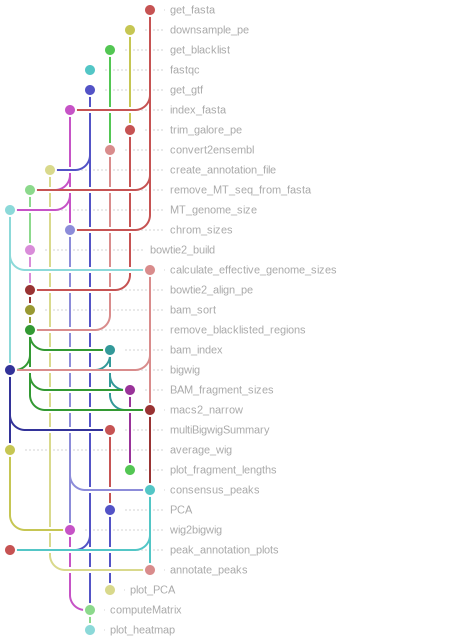
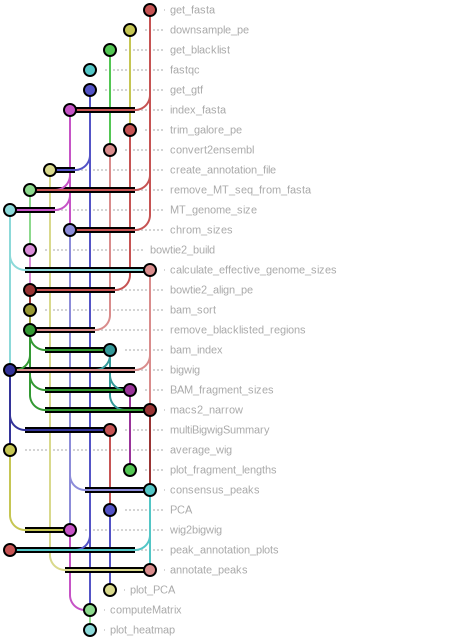
Workflow Rule Graph
This visualization of the workflow’s rule graph was automatically generated using Snakevision
Deployment
Step 1: Install Snakemake and Snakedeploy
Snakemake and Snakedeploy are best installed via the Conda package manager. It is recommended to install conda via Miniforge. Run
conda create -c conda-forge -c bioconda -c nodefaults --name snakemake snakemake snakedeploy
to install both Snakemake and Snakedeploy in an isolated environment. For all following commands ensure that this environment is activated via
conda activate snakemake
For other installation methods, refer to the Snakemake and Snakedeploy documentation.
Step 2: Deploy workflow
With Snakemake and Snakedeploy installed, the workflow can be deployed as follows. First, create an appropriate project working directory on your system and enter it:
mkdir -p path/to/project-workdir
cd path/to/project-workdir
In all following steps, we will assume that you are inside of that directory. Then run
snakedeploy deploy-workflow https://github.com/niekwit/cut_and_run . --tag v0.7.0
Snakedeploy will create two folders, workflow and config. The former contains the deployment of the chosen workflow as a Snakemake module, the latter contains configuration files which will be modified in the next step in order to configure the workflow to your needs.
Step 3: Configure workflow
To configure the workflow, adapt config/config.yml to your needs following the instructions below.
Step 4: Run workflow
The deployment method is controlled using the --software-deployment-method (short --sdm) argument.
To run the workflow with automatic deployment of all required software via conda/mamba, use
snakemake --cores all --sdm conda
Snakemake will automatically detect the main Snakefile in the workflow subfolder and execute the workflow module that has been defined by the deployment in step 2.
For further options such as cluster and cloud execution, see the docs.
Step 5: Generate report
After finalizing your data analysis, you can automatically generate an interactive visual HTML report for inspection of results together with parameters and code inside of the browser using
snakemake --report report.zip
Configuration
The following section is imported from the workflow’s config/README.md.
Samples.csv
Use this file to describe sample meta data:
sample: sample name that matches read file name without extension
genotype: genotype of the sample
treatment: treatment condition
The condition of each IP sample is {genotype}_{treatment}_{factor}; consensus peaks are made per condition
factor: antibody used or input/IgG
batch: numerical value for batch
control: (optional) name of the matched IgG/input sample
macs2: (optional) MACS2 peak calling mode, narrow or broad (same for all samples of a factor); without this column, peak_calling:macs2:broad in config.yaml is used
reference: yes for the reference condition (reserved for DiffBind, not currently run)
downsample.csv (optional)
Use this file to downsample reads before trimming (with seqtk, seed set by downsample_seed in config.yaml):
sample: IP or control sample name
percentage: percentage of reads to keep (0-100; samples not listed or set to 100 keep all reads)
Workflow parameters
The following table is automatically parsed from the workflow’s config.schema.y(a)ml file.
Parameter |
Type |
Description |
Required |
Default |
|---|---|---|---|---|
genome |
string |
Ensembl genome |
yes |
|
ensembl_genome_build |
integer |
Gencode genome build |
yes |
|
spike_in |
yes |
|||
. apply_spike_in |
boolean |
|||
. genome |
string |
|||
. ensembl_genome_build |
integer |
|||
. normalisation |
string |
|||
use_trim_galore |
boolean |
Use Trim_galore instead of cutadapt |
yes |
|
downsample_seed |
integer |
Random seed for seqtk sample (downsampling set in config/downsample.csv) |
42 |
|
cutadapt |
yes |
|||
. a |
array |
yes |
||
. A |
array |
yes |
||
. g |
array |
yes |
||
. G |
array |
yes |
||
. b |
array |
yes |
||
. B |
array |
yes |
||
. extra |
string |
yes |
||
. min_length |
integer |
yes |
||
remove_MT_seqs |
boolean |
Create bowtie2 index without MT sequences |
yes |
|
bowtie2 |
yes |
|||
. min_length |
integer |
yes |
||
. max_length |
integer |
yes |
||
. MAPQ_cutoff |
integer |
yes |
||
. extra |
string |
yes |
||
. samtools_extra |
string |
yes |
||
deeptools |
yes |
|||
. bigwig |
||||
. . normalisation |
string |
yes |
||
. . binsize |
integer |
yes |
||
. . extra |
string |
yes |
||
. matrix |
||||
. . mode |
string |
yes |
||
. . referencePoint |
string |
yes |
||
. . regionBodyLength |
integer |
yes |
||
. . upstream |
integer |
yes |
||
. . downstream |
integer |
yes |
||
. . binSize |
integer |
yes |
||
. . averageTypeBins |
string |
yes |
||
. . regionsFileName |
string |
yes |
||
. . no_whole_genome |
boolean |
yes |
||
. . extra |
string |
yes |
||
. plotHeatmap |
||||
. . interpolationMethod |
string |
yes |
||
. . plotType |
string |
yes |
||
. . colorMap |
string |
yes |
||
. . alpha |
number |
yes |
||
. . extra |
string |
yes |
||
peak_calling |
yes |
|||
. macs2 |
||||
. . use_macs2 |
boolean |
yes |
||
. . broad |
boolean |
yes |
||
. . qvalue |
yes |
|||
. . broad_cutoff |
yes |
|||
. . extra |
string |
yes |
||
. . consensus_peaks |
yes |
|||
. . . max_size |
integer |
yes |
||
. . . extend_by |
integer |
yes |
||
. . . keep |
integer |
yes |
||
. . . enrichment_analysis |
yes |
|||
. . . . run |
boolean |
yes |
||
. . . . dbs |
array |
yes |
||
. . . . terms |
integer |
yes |
||
. htseq_count |
||||
. . use_htseq_count |
boolean |
yes |
||
. . mode |
string |
yes |
||
. . feature |
string |
yes |
||
. . extra |
string |
yes |
||
. . DESeq2 |
yes |
|||
. . . cumulative_filter_out |
integer |
yes |
||
. . . smallest_group |
integer |
yes |
||
. . . alpha |
number |
yes |
||
. . . fc |
number |
log2 fold change cut off for volcano plots |
yes |
|
. . . deseq2_apply_control |
boolean |
yes |
||
resources |
yes |
|||
. trim |
yes |
|||
. . cpu |
integer |
|||
. . time |
integer |
|||
. fastqc |
yes |
|||
. . cpu |
integer |
|||
. . time |
integer |
|||
. index |
yes |
|||
. . cpu |
integer |
|||
. . time |
integer |
|||
. mapping |
yes |
|||
. . cpu |
integer |
|||
. . time |
integer |
|||
. samtools |
yes |
|||
. . cpu |
integer |
|||
. . time |
integer |
|||
. deeptools |
yes |
|||
. . cpu |
integer |
|||
. . time |
integer |
|||
. macs2 |
yes |
|||
. . cpu |
integer |
|||
. . time |
integer |
|||
. deseq2 |
yes |
|||
. . cpu |
integer |
|||
. . time |
integer |
|||
. diffbind |
yes |
|||
. . cpu |
integer |
|||
. . time |
integer |
|||
. plotting |
yes |
|||
. . cpu |
integer |
|||
. . time |
integer |
Linting and formatting
Linting results
 1/home/runner/work/snakemake-workflow-catalog/snakemake-workflow-catalog/.pixi/envs/default/lib/python3.13/site-packages/google/auth/transport/grpc.py:43: FutureWarning: grpcio < 1.83.0 does not support Post-Quantum Cryptography (PQC). Support for non-PQC environments is deprecated. In April 2027, google-auth will raise its minimum requirements to enforce grpcio >= 1.83.0. For more details on Google Cloud's post-quantum security migration, visit: https://cloud.google.com/security/resources/post-quantum-cryptography
 2  warnings.warn(
 3Running workflow version v0.7.0
 4No validator found for JSON Schema version identifier 'http://json-schema.org/draft-06/schema#'
 5Defaulting to validator for JSON Schema version 'https://json-schema.org/draft/2020-12/schema'
 6Note that schema file may not be validated correctly.
 7AssertionError in file "/tmp/tmpoferg2yh/niekwit-cut_and_run-280ed6f/workflow/scripts/general_functions.smk", line 578:
 8No fastq files found...
 9  File "/tmp/tmpoferg2yh/niekwit-cut_and_run-280ed6f/workflow/Snakefile", line 38, in <module>
10  File "/tmp/tmpoferg2yh/niekwit-cut_and_run-280ed6f/workflow/scripts/general_functions.smk", line 578, in paired_end
Formatting results
All tests passed!