
snakemake-workflows/calculate-codon-usage


Standardised Snakemake workflow for calculating codon usage statics of coding sequences, including the RSCU (relative synonymous codon usage).
Overview
Latest release: v1.0.0, Last update: 2026-11-02
Share link: https://snakemake.github.io/snakemake-workflow-catalog?wf=snakemake-workflows/calculate-codon-usage
Quality control: linting: passed formatting: failed
Wrappers: bio/reference/ensembl-biomart-table bio/reference/ensembl-sequence utils/miller utils/sed
Workflow Rule Graph
This visualization of the workflow’s rule graph was automatically generated using Snakevision
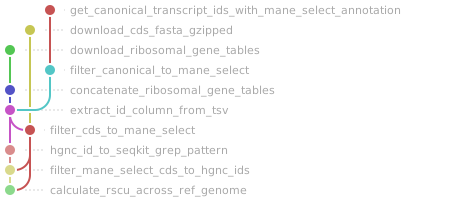
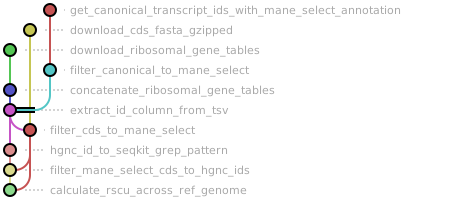
Deployment
Step 1: Install Snakemake and Snakedeploy
Snakemake and Snakedeploy are best installed via the Conda package manager. It is recommended to install conda via Miniforge. Run
conda create -c conda-forge -c bioconda -c nodefaults --name snakemake snakemake snakedeploy
to install both Snakemake and Snakedeploy in an isolated environment. For all following commands ensure that this environment is activated via
conda activate snakemake
For other installation methods, refer to the Snakemake and Snakedeploy documentation.
Step 2: Deploy workflow
With Snakemake and Snakedeploy installed, the workflow can be deployed as follows. First, create an appropriate project working directory on your system and enter it:
mkdir -p path/to/project-workdir
cd path/to/project-workdir
In all following steps, we will assume that you are inside of that directory. Then run
snakedeploy deploy-workflow https://github.com/snakemake-workflows/calculate-codon-usage . --tag v1.0.0
Snakedeploy will create two folders, workflow and config. The former contains the deployment of the chosen workflow as a Snakemake module, the latter contains configuration files which will be modified in the next step in order to configure the workflow to your needs.
Step 3: Configure workflow
To configure the workflow, adapt config/config.yml to your needs following the instructions below.
Step 4: Run workflow
The deployment method is controlled using the --software-deployment-method (short --sdm) argument.
To run the workflow using apptainer/singularity, use
snakemake --cores all --sdm apptainer
To run the workflow using a combination of conda and apptainer/singularity for software deployment, use
snakemake --cores all --sdm conda apptainer
To run the workflow with automatic deployment of all required software via conda/mamba, use
snakemake --cores all --sdm conda
Snakemake will automatically detect the main Snakefile in the workflow subfolder and execute the workflow module that has been defined by the deployment in step 2.
For further options such as cluster and cloud execution, see the docs.
Step 5: Generate report
After finalizing your data analysis, you can automatically generate an interactive visual HTML report for inspection of results together with parameters and code inside of the browser using
snakemake --report report.zip
Configuration
The following section is imported from the workflow’s config/README.md.
Workflow overview
This workflow is a best-practice workflow for calculating codon usage on coding sequences, including the RSCU (relative synonymous codon usage). The initial version of this workflow restricts analysis to the coding sequences of MANE_select transcripts, thus implicitly restricting the workflow to human codon usage. But it could be generalized further for other species, if a representative transcript for each protein coding gene can be chosen programatically. In addition, the workflow also calculates the codon usage of all (human) ribosomal genes, whose identifiers are retrieved from these two curated list on HGNC:
small ribosomal subunit genes: https://www.genenames.org/cgi-bin/genegroup/download?id=728&type=node
large ribosomal subunit genes: https://www.genenames.org/cgi-bin/genegroup/download?id=729&type=node
Any generalization would need to make this output optional or find a programmatic way to get this list of genes for other species.
The workflow is built using snakemake and consists of the following steps:
Download the full CDS (coding sequence) reference from Ensembl.
Download the lists of small and large ribosomal subunit genes.
Get a full list of canonical transcripts from Ensembl, with MANE_select annotations, from Ensembl BioMart.
Filter this to a list of all Ensembl IDs for MANE_select transcripts.
Filter the CDS reference to just the MANE_select transcripts.
Filter that MANE_select CDS reference further down to ribosomal genes.
Calculate the RSCU values for the full MANE_select CDS set and the ribosomal MANE_select CDS set.
The RSCU (relative synonymous codon usage) calculation uses the formula introduced by Sharp et al. (1986), namely:
RSCU_{ij} = \frac{x_{ij}}{\frac{1}{n_i} \sum_{j=1}^{n_i} x_{ij}}
To cite the paper:
$x_{ij}$ is the number of occurrences of the $j$ th codon for the $i$ th amino acid, which is encoded by $n_i$ synonymous codons. (More simply RSCU is the observed number of occurrences divided by that expected if usage of synonymous codons was uniform).
Sharp, P. M.; Tuohy, T. M. F.; Mosurski, K. R. Codon Usage in Yeast: Cluster Analysis Clearly Differentiates Highly and Lowly Expressed Genes. Nucleic Acids Res 1986, 14 (13), 5125–5143. https://doi.org/10.1093/nar/14.13.5125
Running the workflow
This workflow does not need any input data.
Everything can be configured in the config/config.yaml file, which contains explanatory comments.
Workflow parameters
The following table is automatically parsed from the workflow’s config.schema.y(a)ml file.
Parameter |
Type |
Description |
Required |
Default |
|---|---|---|---|---|
ref |
||||
. species |
string |
yes |
||
. release |
integer |
yes |
||
. build |
string |
yes |
Linting and formatting
Linting results
All tests passed!
Formatting results
1[DEBUG]
2<unknown>:1: SyntaxWarning: invalid escape sequence '\('
3[DEBUG]
4[DEBUG]
5[DEBUG] In file "/tmp/tmp6k8jlyca/snakemake-workflows-calculate-codon-usage-3c8d415/workflow/rules/common.smk":  Formatted content is different from original
6[INFO] 1 file(s) would be changed 😬
7[INFO] 2 file(s) would be left unchanged 🎉
8
9snakefmt version: 0.11.5