
westerdijk-wm/snakemake-mlsa-ani



Snakemake workflow for MLSA and ANI analysis
Overview
Latest release: v1.0.0, Last update: 2026-09-28
Share link: https://snakemake.github.io/snakemake-workflow-catalog?wf=westerdijk-wm/snakemake-mlsa-ani
Quality control: linting: passed formatting: passed
Wrappers: bio/fasttree bio/minimap2/aligner bio/quast
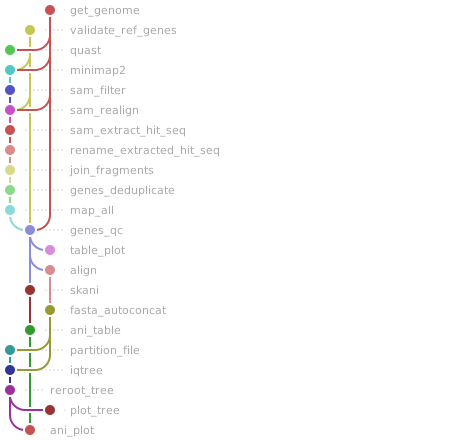
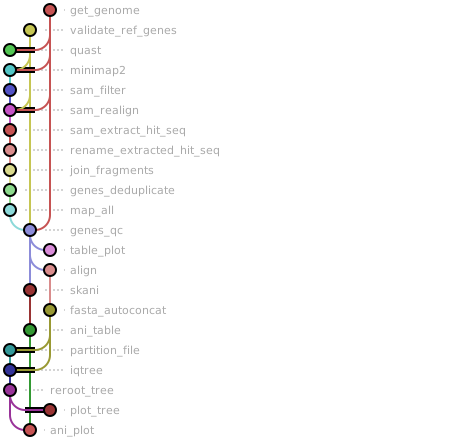
Workflow Rule Graph
This visualization of the workflow’s rule graph was automatically generated using Snakevision
Deployment
Step 1: Install Snakemake and Snakedeploy
Snakemake and Snakedeploy are best installed via the Conda package manager. It is recommended to install conda via Miniforge. Run
conda create -c conda-forge -c bioconda -c nodefaults --name snakemake snakemake snakedeploy
to install both Snakemake and Snakedeploy in an isolated environment. For all following commands ensure that this environment is activated via
conda activate snakemake
For other installation methods, refer to the Snakemake and Snakedeploy documentation.
Step 2: Deploy workflow
With Snakemake and Snakedeploy installed, the workflow can be deployed as follows. First, create an appropriate project working directory on your system and enter it:
mkdir -p path/to/project-workdir
cd path/to/project-workdir
In all following steps, we will assume that you are inside of that directory. Then run
snakedeploy deploy-workflow https://github.com/westerdijk-wm/snakemake-mlsa-ani . --tag v1.0.0
Snakedeploy will create two folders, workflow and config. The former contains the deployment of the chosen workflow as a Snakemake module, the latter contains configuration files which will be modified in the next step in order to configure the workflow to your needs.
Step 3: Configure workflow
To configure the workflow, adapt config/config.yml to your needs following the instructions below.
Step 4: Run workflow
The deployment method is controlled using the --software-deployment-method (short --sdm) argument.
To run the workflow using a combination of conda and apptainer/singularity for software deployment, use
snakemake --cores all --sdm conda apptainer
To run the workflow with automatic deployment of all required software via conda/mamba, use
snakemake --cores all --sdm conda
Snakemake will automatically detect the main Snakefile in the workflow subfolder and execute the workflow module that has been defined by the deployment in step 2.
For further options such as cluster and cloud execution, see the docs.
Step 5: Generate report
After finalizing your data analysis, you can automatically generate an interactive visual HTML report for inspection of results together with parameters and code inside of the browser using
snakemake --report report.zip
Configuration
The following section is imported from the workflow’s config/README.md.
Configuration
The workflow is configured through config/config.yaml.
This file defines the analysis parameters: loci selection, phylogenetic inference settings, ANI options, and optional inclusion of public genomes.
Full configuration example
An example config.yaml configuration looks like this:
# Gene configuration — names must match headers in ref-genes.fas exactly
genes:
  - calmodulin
  - actin
  - rpb2
  - benA

# Tree configuration
tree:
  method: iqtree    # iqtree | raxml | fasttree
  bootstrap: 1000

# ANI configuration
ani_method: skani   # skani | fastani | pyani | none

# Reference gene database
ref_genes: config/ref-genes.fas

# Optional: public genomes to download from NCBI
accessions: config/public_genomes.txt
Key |
Required |
Description |
|---|---|---|
|
Yes |
List of MLSA loci to extract and analyze. |
|
Yes |
Phylogenetic inference method ( |
|
Depends on method |
Number of bootstrap replicates. |
|
Yes |
ANI tool to use ( |
|
Yes |
Path to the reference gene FASTA database. |
|
No |
Path to TSV listing NCBI accessions to download. |
Genes (MLSA loci)
genes defines which loci are extracted from genome assemblies and used for
multilocus sequence analysis. Each gene corresponds to a reference locus in
the reference gene database and the names must match exactly.
At least one gene must be specified.
You may specify a subset of the genes present in the reference database to run a reduced analysis.
Reference gene database format
The reference loci are defined in the file pointed to by ref_genes
(default: config/ref-genes.fas). Each sequence must follow the required
header format:
>{strain}|{gene} {optional description}
For example:
>Af293|actin NC_007199.1:c1114851-1113100 act1
AAGAAGTTGCTGCTCTCGTCATCGACAATGGGTATGTCTTTTATCTTCAG.....
Requirements:
The header must contain a strain ID and gene name separated by
|.Each
strain|genecombination must be unique.Gene names must match those listed under
genesinconfig.yaml.Any text after the first space is treated as an optional description and is ignored during parsing.
It is also possible to include homologous genes from different strains (e.g.
flavus|actin, fumigatus|actin). This enables consistent locus comparisons
across taxa and is important for downstream phylogenetic inference.
The database is validated automatically at the start of each run. See Outputs for details on validation results.
Phylogenetic inference
Phylogenetic reconstruction is configured under tree. The selected method
determines which inference algorithm is used.
iqtree (recommended)
Automatic model selection (ModelFinder Plus,
-m MFP)Ultrafast bootstrap approximation
Bootstrap (
tree.bootstrap):Minimum: 100 (lower values raise an error)
Recommended: ≥ 1000 (lower values trigger a warning)
raxml
Maximum likelihood inference under GTR+GAMMA
Standard bootstrap support
Bootstrap (
tree.bootstrap):Minimum: 1 (lower values raise an error)
Recommended: ≥ 100 (lower values trigger a warning)
fasttree
Very fast approximate tree inference under GTR+GAMMA
No bootstrap support
tree.bootstrapis ignored if set (a warning is printed)
ANI analysis
Configured under ani_method. Available options:
skani (recommended)
Fast sketch-based ANI estimation
Scales well to large genome sets
fastani
Pairwise ANI computation
Relatively fast
pyani
ANIm-based ANI and alignment coverage analysis
Relatively slow; produces both identity and coverage matrices
none
Disables ANI analysis entirely; no ANI rules are included in the workflow
Genome input
Genome assemblies must be placed in the genomes/ directory.
Supported file extensions:
.fna.fa.fasta.fas
Each file must contain a single genome assembly. The sample name used downstream is derived from the filename (without extension).
Public genomes
Additional public genomes can be specified via accessions in config.yaml,
pointing to a tab-separated file (default: config/public_genomes.txt) with
a sample column and an assembly column:
sample	assembly
Af293	GCA_000002655.1
A1163	GCA_000150145.1
IFM58399	GCA_010724455.1
PK20-01	GCA_023625555.1
IFM46973	GCA_001078395.2
IFM46972	GCA_010723835.1
NRRL181	GCA_000149645.4
NRRL4585	GCA_014250575.1
sampleis the name used for that genome throughout the workflow.assemblymust be a valid NCBI assembly accession (GCA_orGCF_).Downloaded assemblies are placed in
resources/public_genomes/and processed identically to local genomes fromgenomes/.
Compute resources
The number of threads available to the workflow is controlled via Snakemake’s
--cores option:
snakemake --cores 10 --use-conda
Most rules use threads: workflow.cores and will use all available cores. A
few rules (gene extraction, alignment, concatenation) request
min(4, workflow.cores) threads, since these steps rarely benefit from more
than 4 threads per task. If --cores is set below 4, these rules
automatically scale down to the available core count.
Running with very few cores (e.g. --cores 2) is supported and will not cause
errors, but will increase runtime, particularly for QUAST, minimap2, IQ-TREE,
and ANI computation.
Workflow parameters
The following table is automatically parsed from the workflow’s config.schema.y(a)ml file.
Parameter |
Type |
Description |
Required |
Default |
|---|---|---|---|---|
accessions |
string |
Path to a TSV file (columns: sample, assembly) listing public genomes to download from NCBI. The key may be omitted or commented out entirely to run with local genomes only. |
||
ani_method |
string |
skani |
||
genes |
array |
yes |
||
ref_genes |
string |
Path to the reference gene FASTA file. |
yes |
|
tree |
yes |
|||
. method |
string |
yes |
iqtree |
|
. bootstrap |
integer |
1000 |
Linting and formatting
Linting results
All tests passed!
Formatting results
All tests passed!