
MPUSP/snakemake-bacterial-rnaseq-processing


A Snakemake workflow for the processing of short read rnaseq data in bacteria.
Overview
Latest release: v2.1.0, Last update: 2026-09-22
Share link: https://snakemake.github.io/snakemake-workflow-catalog?wf=MPUSP/snakemake-bacterial-rnaseq-processing
Quality control: linting: passed formatting: passed
Topics: bioinformatics bioinformatics-pipeline computational-biology conda rnaseq-pipeline snakemake workflow rnaseq biosciences snakemake-workflow
Wrappers: bio/deeptools/bamcoverage bio/deeptools/multibigwigsummary bio/deeptools/plotcorrelation bio/deeptools/plotcoverage bio/fastp bio/fastqc bio/gffread bio/multiqc bio/rseqc/infer_experiment bio/samtools/flagstat bio/samtools/index bio/samtools/sort bio/star/align bio/star/index
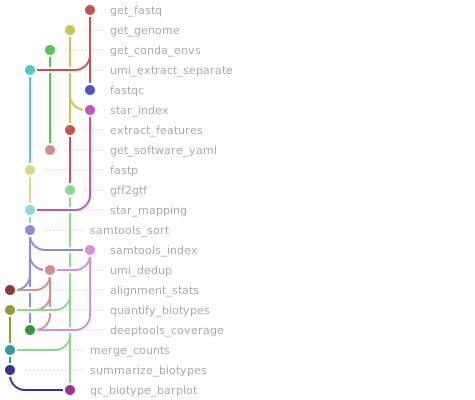
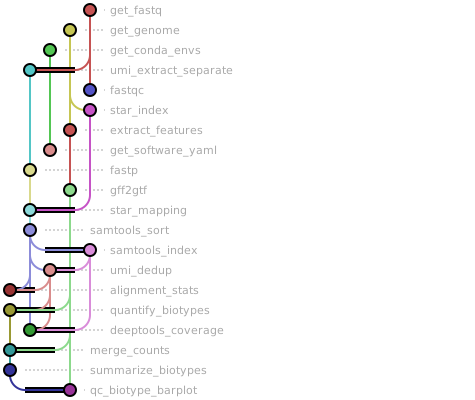
Workflow Rule Graph
This visualization of the workflow’s rule graph was automatically generated using Snakevision
Deployment
Step 1: Install Snakemake and Snakedeploy
Snakemake and Snakedeploy are best installed via the Conda package manager. It is recommended to install conda via Miniforge. Run
conda create -c conda-forge -c bioconda -c nodefaults --name snakemake snakemake snakedeploy
to install both Snakemake and Snakedeploy in an isolated environment. For all following commands ensure that this environment is activated via
conda activate snakemake
For other installation methods, refer to the Snakemake and Snakedeploy documentation.
Step 2: Deploy workflow
With Snakemake and Snakedeploy installed, the workflow can be deployed as follows. First, create an appropriate project working directory on your system and enter it:
mkdir -p path/to/project-workdir
cd path/to/project-workdir
In all following steps, we will assume that you are inside of that directory. Then run
snakedeploy deploy-workflow https://github.com/MPUSP/snakemake-bacterial-rnaseq-processing . --tag v2.1.0
Snakedeploy will create two folders, workflow and config. The former contains the deployment of the chosen workflow as a Snakemake module, the latter contains configuration files which will be modified in the next step in order to configure the workflow to your needs.
Step 3: Configure workflow
To configure the workflow, adapt config/config.yml to your needs following the instructions below.
Step 4: Run workflow
The deployment method is controlled using the --software-deployment-method (short --sdm) argument.
To run the workflow using a combination of conda and apptainer/singularity for software deployment, use
snakemake --cores all --sdm conda apptainer
To run the workflow with automatic deployment of all required software via conda/mamba, use
snakemake --cores all --sdm conda
Snakemake will automatically detect the main Snakefile in the workflow subfolder and execute the workflow module that has been defined by the deployment in step 2.
For further options such as cluster and cloud execution, see the docs.
Step 5: Generate report
After finalizing your data analysis, you can automatically generate an interactive visual HTML report for inspection of results together with parameters and code inside of the browser using
snakemake --report report.zip
Configuration
The following section is imported from the workflow’s config/README.md.
Workflow overview
This workflow can be used in combination with subsequent workflows for follow-up analyses. For example, differential expression analysis can be performed using snakemake-bacterial-rnaseq-deseq.
This workflow is a best-practice workflow for the processing of short read sequencing data in bacteria. The workflow is built using snakemake and consists of the following steps:
Obtain genome database in
fastaandgffformat (python, NCBI Datasets)Using automatic download from NCBI with a
RefSeqIDUsing user-supplied files
Check quality of input sequencing data (FastQC)
Cut adapters and filter by length and/or sequencing quality score (fastp)
Identify unique molecular identifier (UMI, UMI-tools)
Map reads to the reference genome (STAR aligner)
Sort and index aligned RNA-Seq data (Samtools)
Deduplicate reads by unique molecular identifier (UMI, UMI-tools)
Generate cpm normalized coverage files (deepTools)
Generate global coverage summary (deepTools)
Quantify biotype features (featureCounts)
Generate summary report for all processing steps (MultiQC)
Running the workflow
Input
Reference genome
An NCBI Refseq ID, e.g. GCF_000006785.2. Find your genome assembly and corresponding ID on NCBI genomes. Alternatively use a custom pair of *.fasta file and *.gff file that describe the genome of choice.
Important requirements when using custom *.fasta and *.gff files:
*.gffgenome annotation must have the same chromosome/region name as the*.fastafile (example:NC_002737.2)*.gffgenome annotation must havegeneandCDStype annotation that is automatically parsed to extract transcriptsall chromosomes/regions in the
*.gffgenome annotation must be present in the*.fastasequencebut not all sequences in the
*.fastafile need to have annotated genes in the*.gfffile
Read data
RNA sequencing data in *.fastq.gz format. The currently supported input data are second generation reads. Input data files are supplied via a mandatory table, whose location is indicated in the config.yml file (default: samples.tsv). The sample sheet has the following layout:
sample |
condition |
replicate |
read1 |
read2 |
readumi |
|---|---|---|---|---|---|
RNA-1 |
RNA |
1 |
RNA-1_R1.fastq.gz |
RNA-1_R2.fastq.gz |
- |
RNA-2 |
RNA |
2 |
RNA-2_R2.fastq.gz |
RNA-2_R2.fastq.gz |
- |
Some configuration parameters of the pipeline may be specific for your data and library preparation protocol. The options should be adjusted in the config.yml file.
Configuration files for different sequencing protocols can be found in resources/protocols/.
Currently, you may find protocols for i.e. rnaseq_nextflex, rnaseq_neb_umi and a custom protocol rnaseq_mpusp_custom.
To run the workflow with the respective test data for the different protocols, use the following commands:
snakemake --sdm conda --cores 12 --directory .test --configfile resources/protocols/rnaseq_mpusp_custom.yml
snakemake --sdm conda --cores 12 --directory .test --configfile resources/protocols/rnaseq_neb_umi.yml
snakemake --sdm conda --cores 12 --directory .test --configfile resources/protocols/rnaseq_nextflex.yml
Output
Output File/Folder |
Description |
|---|---|
|
Correlation analysis of coverage generated by deepTools. |
|
Global coverage summary generated by deepTools. |
|
Aligned and UMI-deduplicated reads in BAM format, coverage in BigWig format. |
|
Features used for quantification in GFF format. |
|
Adapter-trimmed and quality-filtered FASTQ files. |
|
Quality control reports for raw and processed reads (FastQC HTML files). |
|
Downloaded or user-supplied reference genome and annotation files. |
|
Inferred experiment information per sample. |
|
Aligned reads in BAM format, coverage in BigWig format |
|
MultiQC report aggregating QC metrics from all steps. |
|
Quality control reports for raw and processed reads (FastQC HTML files). |
|
Gene/feature count tables (tab-delimited text files). |
|
Temporary files generated during the workflow execution. |
Workflow parameters
The following table is automatically parsed from the workflow’s config.schema.y(a)ml file.
Parameter |
Type |
Description |
Required |
Default |
|---|---|---|---|---|
samplesheet |
string |
Path to the sample sheet TSV file. |
yes |
config/samplesheet/samples.tsv |
libtype |
string |
Library strandedness used during quantification. |
yes |
antisense |
get_genome |
yes |
|||
. database |
[‘string’, ‘null’] |
Genome source database identifier. |
ncbi |
|
. assembly |
[‘string’, ‘null’] |
Assembly accession or identifier to download. |
GCF_043231225.1 |
|
. fasta |
[‘string’, ‘null’] |
Optional path to a local FASTA file. |
||
. gff |
[‘string’, ‘null’] |
Optional path to a local GFF annotation file. |
||
. gff_source_type |
array |
Source/feature-type pairs used to select annotation records. |
[{‘RefSeq’: ‘gene’}, {‘RefSeq’: ‘pseudogene’}, {‘RefSeq’: ‘CDS’}, {‘Protein Homology’: ‘CDS’}] |
|
extract_features |
yes |
|||
. biotypes |
array |
Feature biotypes to keep for downstream summarization. |
[‘protein_coding’, ‘pseudogene’, ‘ncRNA’, ‘rRNA’, ‘tRNA’] |
|
umi_extraction |
yes |
|||
. method |
string |
UMI extraction mode, one of “regex”, “string”, or “none”. |
none |
|
. pattern |
string |
UMI pattern used by the selected extraction method. |
||
umi_dedup |
string |
Additional command-line options for UMI deduplication. |
yes |
–edit-distance-threshold=0 |
fastp |
yes |
|||
. extra |
string |
Extra arguments passed to fastp. |
see config.yml |
|
star |
yes |
|||
. index |
[‘string’, ‘null’] |
STAR indexing options. |
–genomeSAindexNbases 9 |
|
. extra |
array |
Extra arguments passed to STAR during mapping. |
[’–outFilterMultimapNmax 10’, ‘–outSAMmultNmax 1’, ‘–outMultimapperOrder Random’, ‘–alignIntronMax 1’] |
|
infer_experiment |
yes |
|||
. gffread |
||||
. . extra |
string |
Extra arguments passed to gffread. |
||
. rseqc |
||||
. . extra |
string |
Extra arguments passed to rseqc infer_experiment. |
–sample-size 10000 |
|
samtools |
yes |
|||
. sort |
string |
Extra options passed to samtools sort. |
||
. index |
string |
Extra options passed to samtools index. |
||
feature_counts |
yes |
|||
. defaults |
array |
Default options passed to featureCounts. |
[‘-F GTF’, ‘-t gene’, ‘-g locus_tag’, ‘-M’, ‘–fracOverlap 0.2’, ‘–largestOverlap’] |
|
deeptools |
yes |
|||
. coverage |
||||
. . genome_size |
number |
Effective genome size used for coverage normalization. |
2000000 |
|
. . extra |
string |
Extra options passed to bamCoverage. |
–binSize 1 –normalizeUsing CPM –exactScaling –extendReads |
|
. plotcoverage |
||||
. . extra |
string |
Extra options passed to plotCoverage. |
–coverageThresholds 1 |
|
. multibwsummary |
||||
. . extra |
string |
Extra options passed to multiBigwigSummary. |
||
. plotcorrelation |
||||
. . extra |
string |
Extra options passed to plotCorrelation. |
–skipZeros |
|
fastqc |
yes |
|||
. extra |
string |
Extra arguments passed to FastQC. |
–quiet –nogroup |
|
multiqc |
yes |
|||
. config |
string |
Path to the MultiQC configuration file. |
config/multiqc_config.yml |
|
. extra |
string |
Extra arguments passed to MultiQC. |
–dirs |
Linting and formatting
Linting results
All tests passed!
Formatting results
All tests passed!