
MPUSP/snakemake-ms-proteomics


Pipeline for automatic processing and quality control of mass spectrometry data
Overview
Latest release: v1.1.1, Last update: 2026-09-25
Share link: https://snakemake.github.io/snakemake-workflow-catalog?wf=MPUSP/snakemake-ms-proteomics
Quality control: linting: passed formatting: passed
Topics: bioinformatics conda mass-spectrometry pipeline proteomics snakemake snakemake-workflow workflow
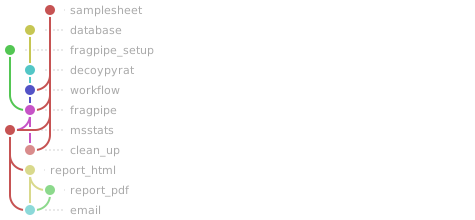
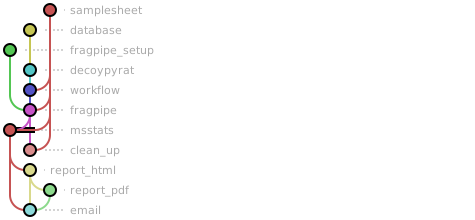
Workflow Rule Graph
This visualization of the workflow’s rule graph was automatically generated using Snakevision
Deployment
Step 1: Install Snakemake and Snakedeploy
Snakemake and Snakedeploy are best installed via the Conda package manager. It is recommended to install conda via Miniforge. Run
conda create -c conda-forge -c bioconda -c nodefaults --name snakemake snakemake snakedeploy
to install both Snakemake and Snakedeploy in an isolated environment. For all following commands ensure that this environment is activated via
conda activate snakemake
For other installation methods, refer to the Snakemake and Snakedeploy documentation.
Step 2: Deploy workflow
With Snakemake and Snakedeploy installed, the workflow can be deployed as follows. First, create an appropriate project working directory on your system and enter it:
mkdir -p path/to/project-workdir
cd path/to/project-workdir
In all following steps, we will assume that you are inside of that directory. Then run
snakedeploy deploy-workflow https://github.com/MPUSP/snakemake-ms-proteomics . --tag v1.1.1
Snakedeploy will create two folders, workflow and config. The former contains the deployment of the chosen workflow as a Snakemake module, the latter contains configuration files which will be modified in the next step in order to configure the workflow to your needs.
Step 3: Configure workflow
To configure the workflow, adapt config/config.yml to your needs following the instructions below.
Step 4: Run workflow
The deployment method is controlled using the --software-deployment-method (short --sdm) argument.
To run the workflow with automatic deployment of all required software via conda/mamba, use
snakemake --cores all --sdm conda
Snakemake will automatically detect the main Snakefile in the workflow subfolder and execute the workflow module that has been defined by the deployment in step 2.
For further options such as cluster and cloud execution, see the docs.
Step 5: Generate report
After finalizing your data analysis, you can automatically generate an interactive visual HTML report for inspection of results together with parameters and code inside of the browser using
snakemake --report report.zip
Configuration
The following section is imported from the workflow’s config/README.md.
workflow overview

This workflow is a best-practice workflow for the automated analysis of mass spectrometry proteomics data. It currently supports automated analysis of data-dependent acquisition (DDA) data with label-free quantification. An extension by different workflows (DIA, isotope labeling) is planned in the future.
The workflow is mainly a wrapper for the excellent tools fragpipe and MSstats, with additional modules that supply and check the required input files, and generate reports. The workflow is built using snakemake and processes MS data using the following steps:
Prepare
workflowfile (pythonscript)Check user-supplied sample sheet (
pythonscript)Check user-supplied database FASTA file (
pythonscript)Generate decoy proteins (DecoyPyrat)
Import raw files, search protein database (fragpipe)
Align feature maps using IonQuant (fragpipe)
Import quantified features, infer and quantify proteins (R MSstats)
Compare different biological conditions, export results (R MSstats)
Generate HTML report with embedded QC plots (R markdown)
Generate PDF report from HTML weasyprint
Send out report by email (
pythonscript)Clean up temporary files after workflow execution (
bashscript)
If you want to contribute, report issues, or suggest features, please get in touch on github.
Running the workflow
Input data
The workflow requires the following input files:
mass spectrometry data, such as Thermo
*.rawor*.mzMLfilesan (organism) database in
*.fastaformat. Decoys (rev_prefix) will be added if necessarya sample sheet in tab-separated format (aka
manifestfile)a
workflowfile for fragpipe (seeresourcesdir)
The samplesheet file has the following structure (example file: .test/config/samplesheet.tsv).
sample: names/paths to raw filesraw_file: path to raw files, can be absolute or relative to the work dircondition: experimental group, treatmentsreplicate: replicate number, consecutively numbered. Repeating numbers (e.g. 1, 2, 1, 2) will be treated as paired samples!method: the type of MS data, will be used to determine the workflowcomparison: reference condition for testing differential abundance. Optional; If you don’t want to make comparisons, leave column empty.
sample_name |
raw_file |
condition |
replicate |
MS_method |
comparison |
|---|---|---|---|---|---|
WT_exp_1 |
data/E1_220707_22C012_sample_01.raw |
WT_exp |
1 |
DDA |
WT_exp |
WT_exp_2 |
data/E1_220707_22C012_sample_02.raw |
WT_exp |
2 |
DDA |
WT_exp |
WT_trans_1 |
data/E1_220707_22C012_sample_03.raw |
WT_trans |
3 |
DDA |
WT_exp |
WT_trans_2 |
data/E1_220707_22C012_sample_04.raw |
WT_trans |
4 |
DDA |
WT_exp |
Fragpipe
Fragpipe is not available on conda or other package archives. However, to make the workflow as user-friendly as possible, the latest fragpipe release from github (currently v22.0) is automatically installed to the respective conda environment when using the workflow the first time. After installation, the GUI (graphical user interface) will pop up and ask to you to finish the installation by downloading the missing modules MSFragger, IonQuant, and Philosopher. This step is necessary to abide to license restrictions. From then on, fragpipe will run in headless mode through command line only.
All other dependencies for the workflow are automatically pulled as conda environments by snakemake.
Missing value imputation
Missing value imputation happens at different stages.
First, the default strategy for fragpipe is to use “match between runs”, i.e. non-identified features in the MS1 spectra are cross-compared with other runs of the same experiment where MS2 identification is available. This strategy is based on actual quantification data and reduces the number of missing feature quantifications.
Second, MSstats imputes two kinds of missing values where absolutely no feature quantification is available: Missing values at random positions are removed during summarization, and missing values due to low abundance are imputed at the feature level via accelerated failure time model.
Missing value treatment can be controlled through the MSstats parameters MBimpute and others.
See the MSstats manual for more information.
Output
The workflow generates the following output from its modules:
samplesheet
samplesheet.tsv: Samplesheet after checking file paths and optionslog.txt: Log file for this module
workflow
workflow.txt: Configuration file forfragpipe, determined from samplesheet.log.txt: Log file for this module
database
database.fasta: The downloaded or user-supplied.fastafile. In the latter case, the file is identical to the input.log.txt: Log file for this module
decoypyrat
decoy_database.fasta: Original.fastafile supplemented with randomized protein sequences.log.txt: Log file for this module
fragpipe
[sample_name]/: Directory containing sample specific output files for each runcombined_ion.tsv: Quantification of ion intensity per peptidecombined_modified_peptide.tsv: Quantification of peptide modificationscombined_peptide.tsv: Quantification of peptides/featurescombined_protein.tsv: Quantification of proteins from petide, inferred byfragpipeMSstats.csv: Qunatification of petides/features, output from fragpipe served inMSstatsfriendly formatother files such as logs, file lists, etc.
log.txt: Log file for this module
msstats
comparison_result.csv: Main table with results about the comparison between different experimental conditionsfeature_level_data.csv: Feature-level quantification data processed by MSstatsmodel_qc.csv: Table with data about the fitted quantification models from MSstatsprotein_level_data.csv: Protein-level quantification data processed by MSstatsuniprot.csv: Optionally downloaded table with protein annotation from Uniprotlog.txt: Log file for this module
report
report.html: Report with figures and tablesreport.pdf: Report with figures and tables in PDF format. Converted from HTMLlog.txt: Log file for this module
log.txt: Log file for this module
clean_up
log.txt: Log file for this module
Workflow parameters
The following table is automatically parsed from the workflow’s config.schema.y(a)ml file.
Parameter |
Type |
Description |
Required |
Default |
|---|---|---|---|---|
samplesheet |
string |
path to the sample sheet in tsv format |
yes |
.test/samplesheet/samplesheet.tsv |
database |
string |
path to protein database in fasta format or a RefSeq identifier |
yes |
.test/database/database.fasta |
workflow |
string |
path to a FragPipe workflow file or from_samplesheet |
yes |
from_samplesheet |
decoypyrat |
options for decoy sequence generation |
yes |
||
. cleavage_sites |
string |
amino acid residues used for decoy peptide generation |
yes |
KR |
. decoy_prefix |
string |
prefix appended to generated decoy protein IDs |
yes |
rev |
fragpipe |
options for FragPipe setup and execution |
yes |
||
. executable |
string |
path to FragPipe executable |
yes |
fragpipe/bin/fragpipe |
. download |
string |
URL to FragPipe release archive |
yes |
https://github.com/Nesvilab/FragPipe/releases/download/24.0/FragPipe-24.0-linux.zip |
. extra |
string |
extra command line options for FragPipe execution |
yes |
|
msstats |
options for MSstats quantification and statistics |
yes |
||
. logTrans |
integer |
base for log fold-change transformation |
yes |
2 |
. normalization |
string |
normalization method used by MSstats |
yes |
equalizeMedians |
. featureSubset |
string |
feature subset used for quantification |
yes |
all |
. summaryMethod |
string |
method to summarize feature intensities to proteins |
yes |
TMP |
. MBimpute |
boolean |
whether to impute missing values at low abundance |
yes |
true |
report |
report generation settings |
yes |
||
. html |
boolean |
generate HTML report |
yes |
true |
boolean |
generate PDF report |
yes |
true |
|
optional email notification settings |
yes |
|||
. send |
boolean |
whether to send reports by email |
yes |
false |
. port |
integer |
SMTP server port |
yes |
0 |
. smtp_server |
string |
SMTP server hostname |
yes |
smtp.example.com |
. smtp_user |
string |
SMTP user name |
yes |
user |
. smtp_pw |
string |
SMTP user password |
yes |
password |
. from |
string |
sender email address |
yes |
sender@email.com |
. to |
array |
recipient email addresses |
yes |
[‘receiver@email.com’] |
. subject |
string |
email subject line |
yes |
Results MS proteomics pipeline |
Linting and formatting
Linting results
All tests passed!
Formatting results
All tests passed!