
cbib/SpaceBlocks


None
Overview
Latest release: v0.5.1, Last update: 2026-10-15
Share link: https://snakemake.github.io/snakemake-workflow-catalog?wf=cbib/SpaceBlocks
Quality control: linting: passed formatting: passed
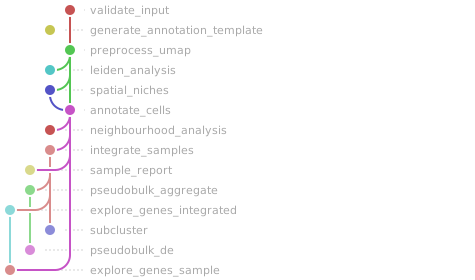
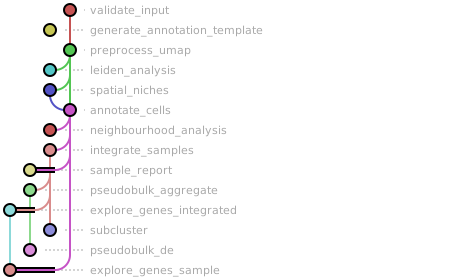
Workflow Rule Graph
This visualization of the workflow’s rule graph was automatically generated using Snakevision
Deployment
Step 1: Install Snakemake and Snakedeploy
Snakemake and Snakedeploy are best installed via the Conda package manager. It is recommended to install conda via Miniforge. Run
conda create -c conda-forge -c bioconda -c nodefaults --name snakemake snakemake snakedeploy
to install both Snakemake and Snakedeploy in an isolated environment. For all following commands ensure that this environment is activated via
conda activate snakemake
For other installation methods, refer to the Snakemake and Snakedeploy documentation.
Step 2: Deploy workflow
With Snakemake and Snakedeploy installed, the workflow can be deployed as follows. First, create an appropriate project working directory on your system and enter it:
mkdir -p path/to/project-workdir
cd path/to/project-workdir
In all following steps, we will assume that you are inside of that directory. Then run
snakedeploy deploy-workflow https://github.com/cbib/SpaceBlocks . --tag v0.5.1
Snakedeploy will create two folders, workflow and config. The former contains the deployment of the chosen workflow as a Snakemake module, the latter contains configuration files which will be modified in the next step in order to configure the workflow to your needs.
Step 3: Configure workflow
To configure the workflow, adapt config/config.yml to your needs following the instructions below.
Step 4: Run workflow
The deployment method is controlled using the --software-deployment-method (short --sdm) argument.
To run the workflow with automatic deployment of all required software via conda/mamba, use
snakemake --cores all --sdm conda
Snakemake will automatically detect the main Snakefile in the workflow subfolder and execute the workflow module that has been defined by the deployment in step 2.
For further options such as cluster and cloud execution, see the docs.
Step 5: Generate report
After finalizing your data analysis, you can automatically generate an interactive visual HTML report for inspection of results together with parameters and code inside of the browser using
snakemake --report report.zip
Configuration
The following section is imported from the workflow’s config/README.md.
This page explains how to fully set up the config files to run SpaceBlocks. Full documentation can be found at https://cbib.github.io/SpaceBlocks/configuration/. If you are visualizing the documentation from the Snakemake catalog we recommend visiting the SpaceBlocks GitHub, since the rendered tube map does not include the HeadBlocks and is not consistently colored.
Copy config/config.yaml.template to config/config.yaml before configuring a run. The template contains all parameters, while the committed config/config.yaml is only the runnable fixture used by the Snakemake Workflow Catalog.
The explanations on this page are divided by type (directory, parameter, color, etc.). In the config file, parameters are divided by Block and function.
Every key in config/config.yaml is validated against workflow/schemas/config.schema.yaml before the run starts, so a typo or a missing required field fails immediately with a clear message.
!!! warning “Complete list of SpaceBlocks parameters” The full, always-updated table of every parameter (type, default, required) is generated automatically from the schema and shown on the workflow’s Snakemake-catalog page. This page covers the how and the why; the schema is the exhaustive reference.
1. Choose a mode
The config mode selects which Headblock builds the standardized contract h5ad. In decoupled mode, SpaceBlocks consumes contract h5ads that already exist.
!!! warning “Space Ranger installation” The Visium HD HeadBlock additionally needs an external Space Ranger installation.
|
Head that runs |
Input |
|---|---|---|
|
|
10x Visium HD fastqs + Space Ranger |
|
|
Xenium output bundle |
|
|
Atera (alpha) output bundle; optional registered H&E inputs |
|
|
MERSCOPE region directory |
|
(none) |
Pre-existing contract h5ad files you provide |
The analysis CoreBlocks are identical in all five cases. Atera support is currently in alpha because the public preview format may change before commercial release.
2. Paths, files and sample sheets
The SpaceBlocks config/config.yaml sets the input and output directories, and gets the sample information and metadata (for integration and plotting) from one or two TSV files, depending on the config["mode"] set.
!!! tip “Setting a base directory”
base_dir is the project-root prefix for generated output directories. In the shipped template, most output folders are written relative to it, but several required inputs are intentionally left as explicit filesystem paths because they point to external software or reference data.
Paths in SpaceBlocks fall into three categories:
Project output paths: typically relative to
base_diror kept under the config directory for metadata files.Project input paths: configuration or pre-computed data used by the pipeline. These can be defined relative to
config/or as absolute paths.External absolute paths: installed tools, references, and other files that must be supplied explicitly.
Project output paths
These are the paths that are normally defined relative to base_dir.
Path / File |
Key |
Condition |
Meaning |
|---|---|---|---|
Path |
|
Mandatory |
Output directory root; it will contain the result folders for the run. |
Path |
|
Mandatory |
Directory for per-rule logs and benchmarks. |
Path |
|
Head modes |
Directory where the head writes heavy intermediates such as Space Ranger outputs or SpatialData Zarr stores. |
Project input paths
These paths contain metadata, configuration or pre-processed results that are ingested by the pipeline. We provide some defaults under the config/config.yaml.template. Others are defined as placeholders /path/to/dir/ and /path/to/file.ext, so make sure to configure them if needed.
Path / File |
Key |
Condition |
Meaning |
|---|---|---|---|
File |
|
Mandatory |
Sample metadata sheet. The shipped template keeps this in |
Path |
|
|
Directory holding the pre-existing contract h5ads to analyse. |
Path |
|
|
Directory pattern for each Xenium bundle. |
Path |
|
|
|
Path |
|
|
|
Path |
|
Optional, recommended |
Directory containing the GeoJSONs that annotate spatial regions for each sample (see the QuPath tutorial). In |
Path |
|
Optional (reproducibility) |
Directory of precomputed per-sample metadata TSVs. The metadata can contain precomputed clusters and/or external annotations. |
Path |
|
Optional (reproducibility) |
Directory for precomputed niche TSVs when |
File |
|
Optional (per-sample filters) |
TSV of sample-specific QC filters. If empty, the same |
File |
|
Optional (pre-annotation) |
TSV of canonical marker genes drawn on the Leiden diagnostic plots ( |
File |
|
Exploration Coreblock |
Genes / gene sets to score (AUCell) and plot in the exploration block. If not set, test gene queries are used ( |
File |
|
Optional |
TSV of cluster-to-cell-type labels used during annotation. Template ships with a template of placeholder annotations ( |
!!! note “GeoJSON filenames”
Region annotation is optional per sample, but a sample-prefixed GeoJSON with an unsupported suffix is treated as an error. Expected suffixes are _tissue_hires_image.geojson for Visium HD, _morphology.geojson for Xenium and MERSCOPE, and either _he_background.geojson or _morphology.geojson for Atera.
Explicit external inputs
These are not derived from base_dir and must be set explicitly to the correct filesystem location.
Path / File |
Key |
Condition |
Meaning |
|---|---|---|---|
File |
|
|
Path to the externally installed Space Ranger executable. |
File |
|
|
Probe set CSV needed to run Space Ranger. |
File |
|
|
Reference transcriptome needed to run Space Ranger. |
File |
|
Optional (auto-annotation) |
Annotated h5ad scRNA-seq reference for |
File |
|
|
Sample sheet with fastq directories, slide, and capture area per sample. |
Sample sheets
core_samples.tsv is the technology-agnostic sample sheet used by the CoreBlocks in every use case. This file must contain a column named sample. Every other column is stamped into each sample’s obs, so it can be used by integration plots and pseudobulk group_by, covariates, or paired_by settings
Visium HD additionally uses visiumhd_samples.csv for fastq, slide, and capture-area information.
For Xenium, Atera, and MERSCOPE, the sample list comes from core_samples, and each input bundle is located with the corresponding {sample} path pattern.
!!! tip “Color customization for result visualization”
You can customize the color scale for any sample metadata in core_samples.tsv as additional columns. See section 3 and section 4 for details.
Sample sheet |
Condition |
Role |
|---|---|---|
|
Mandatory |
The technology-agnostic anchor: one row per sample. The first column is the sample name; any further columns are design metadata (e.g. |
|
|
The Visium HD head sheet: fastq directories (plus any re-sequencing runs), slide, and area per sample. |
3. Common parameters
Parameters are settings that live exclusively in config/config.yaml and determine the details of the run.
Parameter |
Condition |
Role |
|---|---|---|
|
Mandatory |
Which headblock builds the contract (see section 1). |
|
Reproducibility |
Seed for stochastic steps, including PCA, UMAP, Leiden, subclustering, neighbours, and sketching. Results may still differ across software stacks or systems (see section 6). |
|
Optional (reproducibility) |
If |
|
Annotated reference |
Column in the |
|
Mandatory |
Variable Harmony corrects over during integration (e.g. |
|
|
Annotation variants expanded by pseudobulk and neighbourhood analyses. Allowed values are |
|
Optional |
|
|
Optional, default to |
Controls the per-resolution diagnostic plot rule. Leiden clusters are still computed by |
|
Optional |
Enables DESeq2 differential expression. Pseudobulk aggregation may still run when DE is disabled. |
|
Pseudobulk |
Named aggregation/model specifications containing the comparison variables, explicit contrasts, exclusions, optional pairing/covariates, one-vs-rest biomarkers, and optional LRT. |
|
Optional |
Marker size for ordinary UMAP embedding plots (default: |
|
Optional |
Marker size for spatial maps (default: |
4. Color scale customization
In SpaceBlocks, color scales are fully customizable and consistent across analysis plots.
!!! warning “Undefined variable levels are colored in grey”
When customizing color palettes, levels not explicitly listed fall back to grey #cccccc, so a value that renders grey usually means a missing key. If you wish to customize visualization, list all levels in a variable and assign a color for each of them.
To set a given color scale, you just need to specify the HEX color code for each level in config/config.yaml. There are three palette families, each keyed by column → level → hex:
# core_samples.tsv columns: column -> level -> colour
sample_colors:
  patient:
    "Patient 1": "#000000"
    "Patient 2": "#E69F00"
  condition:
    Control: "#0072B2"
    Treatment: "#D55E00"
  batch:
    "Batch 1": "#8E44AD"

# annotation obs columns: column -> level -> colour
annotation_colors:
  cell_type_tsv:
    Tcells: "#1f77b4"
    Fibroblasts: "#2ca02c"
  cell_type_external:       # not inherited from cell_type_tsv
    Tcells: "#1f77b4"
  cell_type_ingest:
    Tcells: "#1f77b4"
  spatial_niche:            # optional override of the deterministic niche palette
    "0": "#4C78A8"

analysis:
  # Preferred display order. For a single region group in pseudobulk,
  # this is also the fallback when condition_order is absent.
  region_levels: ["Tumor area", "Healthy area"]
  # Region level -> colour
  region_colors:
    "Tumor area": "#46337EFF"
    "Healthy area": "#FDE725FF"
Spatial niches are coloured automatically from a deterministic palette unless you add a spatial_niche block under annotation_colors.
region_levels controls ordering, but it does not filter observations. For pseudobulk analyses, you may use exclude_levels to remove values.
5. Key configuration sections
The rest of the configuration lives in comment-separated config chunks. Files and single parameters are covered in section 2 and section 3; colour palettes in section 4.
Section |
Condition |
What it configures |
|---|---|---|
|
|
Visium HD head settings: |
|
|
Xenium head settings: |
|
|
Atera head settings: |
|
|
MERSCOPE head settings: |
|
Optional, defaults are implemented |
Contract keys such as |
|
Optional |
Candidate-threshold QC diagnostics (never filters). |
|
Optional |
Overlay labels from an external tool: |
|
Required |
The bulk of the run: QC filters ( |
|
Optional |
BANKSY niche detection across concatenated samples. |
|
Optional |
Named cell-type subsets to re-cluster in |
|
Exploration CoreBlock |
Genes / gene sets to score (AUCell) and plot in the exploration block, plus its |
|
Color customization |
Annotations for samples, conditions, regions and other variables. |
|
Required |
Per-rule |
!!! note
A few one-key blocks are documented elsewhere for readability: integration (integrate_key) and extra_annotations (columns) are parameters in section 3; cluster_annotations is a file in section 2; and the colour blocks (sample_colors, annotation_colors, analysis.region_colors) are in section 4.
Spatial niches
spatial_niches.enabled: true runs BANKSY jointly across the preprocessed samples. The physical-neighbour and clustering-neighbour parameters are independent:
Key |
Default |
Meaning |
|---|---|---|
|
|
Weight of spatial-neighbour features in the BANKSY matrix. |
|
|
Physical neighbours used to construct BANKSY features. |
|
|
Highest spatial-neighbourhood harmonic used by BANKSY. |
|
|
BANKSY neighbour-weight decay. |
|
|
Restrict BANKSY to highly variable genes. The shipped configs set this to |
|
|
Strongly recommended due to heavy RAM usage. Number of HVGs when |
|
|
Neighbours in the separate Harmony-corrected BANKSY PCA graph used for clustering. |
|
|
Leiden resolution controlling niche granularity. |
|
|
Leiden iterations; |
|
|
Whether to compute the optional integrated BANKSY UMAP. |
|
|
Apply spatial majority-vote refinement to computed or reused labels. |
The BANKSY matrix is dense and has approximately (2 + max_m) × n_genes features. For large datasets, use use_hvg: true and tune n_top_genes to control memory.
With use_precomputed: true, SpaceBlocks skips BANKSY/Leiden and reloads a complete niche_<sample>.tsv for every sample. Missing files or cells will prevent the rule from running.
Pseudobulk experimental designs
Pseudobulk analyses are configured under analysis.pseudobulk.analyses. Each analysis has a stable name, one aggregation, one or more group_by columns, optional covariates and paired_by, exclusions, explicit pairwise contrasts, and optional one-vs-rest and LRT tests.
|
One pseudobulk observation per |
Separate result set per |
|---|---|---|
|
sample |
— |
|
sample and cell type |
cell type |
|
sample and region |
— |
|
sample, cell type and region |
cell type |
cell_type is a portable alias: SpaceBlocks resolves it to the cell-type column for
the active annotation_types entry, so manual TSV, external, and ingest-transferred
cell-type annotations can use the same pseudobulk configuration.
condition_order optionally sets the displayed order of comparison-group labels. With multiple group_by columns, use the combined labels written to pseudobulk metadata, for example condition=Control | treatment=Drug. Unlisted observed levels are appended.
Independent phenotype comparison
Add the experimental variables to core_samples.tsv:
sample	phenotype	batch
Cancer_P1	Cancer	Batch1
Cancer_P2	Cancer	Batch2
Cancer_P3	Cancer	Batch3
Normal_P4	Normal	Batch1
Normal_P5	Normal	Batch2
Normal_P6	Normal	Batch3
Then compare phenotypes for each cell type while adjusting for batch:
analysis:
  run_pseudobulk_de: true
  min_replicates: 3
  pseudobulk:
    analyses:
      - name: phenotype_by_celltype
        aggregation: by_celltype
        group_by: [phenotype]
        covariates: [batch]
        exclude_levels:
          cell_type: [Unannotated]
        contrasts:
          - name: cancer_vs_normal
            numerator: {phenotype: Cancer}
            denominator: {phenotype: Normal}
        lrt:
          enabled: false
The numerator determines the positive log2-fold-change direction. Levels not named
in a pairwise contrast can remain in the fitted model and help dispersion estimation.
Use exclude_levels only for values that should be removed from the analysis entirely.
The exclusions are also applied to one-vs-rest tests and the LRT.
Here P1–P6 are independent samples, so paired_by is omitted. Use covariates only when the design supports estimating them without confounding. Use aggregation: all_cells for one whole-sample result rather than a result per cell type.
Phenotype and treatment
Multiple group_by columns form a combined categorical group. In the example below,
Cancer and Normal phenotype levels are combined with Drug and Vehicle treatment
levels. This supports clear comparisons between observed combinations without exposing
interaction formulas:
- name: treatment_by_celltype
  aggregation: by_celltype
  group_by: [phenotype, treatment]
  exclude_levels:
    cell_type: [Unannotated]
  contrasts:
    - name: drug_vs_vehicle_in_cancer
      numerator: {phenotype: Cancer, treatment: Drug}
      denominator: {phenotype: Cancer, treatment: Vehicle}
This tests one combination against another. It is not a formal interaction or difference-of-differences test.
Paired regions or matched samples
Use paired_by: sample when the same sample contributes both levels of a contrast,
as in tumour and healthy regions from the same section:
- name: regions_by_celltype
  aggregation: by_celltype_region
  group_by: [region_annotation]
  paired_by: sample
  exclude_levels:
    region_annotation: [Unlabeled, Bubble]
    cell_type: [Unannotated]
  contrasts:
    - name: tumor_vs_healthy
      numerator: {region_annotation: Tumor area}
      denominator: {region_annotation: Healthy area}
  one_vs_rest:
    enabled: true
  lrt:
    enabled: true
For a paired Wald contrast, SpaceBlocks retains only matched units containing both
requested levels and interprets min_replicates as the minimum number of complete pairs.
For separate samples matched by patient, add the shared patient identifier to core_samples.tsv and set paired_by: patient, as in this example:
sample	phenotype	patient
Cancer_P1	Cancer	P1
Normal_P1	Normal	P1
Cancer_P2	Cancer	P2
Normal_P2	Normal	P2
Cancer_P3	Cancer	P3
Normal_P3	Normal	P3
- name: matched_phenotype_by_celltype
  aggregation: by_celltype
  group_by: [phenotype]
  paired_by: patient
  contrasts:
    - name: cancer_vs_normal
      numerator: {phenotype: Cancer}
      denominator: {phenotype: Normal}
Thus, use paired_by: sample for multiple region levels from the same spatial sample,
paired_by: patient for separate samples matched by patient, and omit paired_by for
independent Cancer-versus-Normal samples.
Repeated observations without pairing
It is generally a good idea to used paired contrasts when observations can be considered repeated measurements from the same experimental unit. Thus, if no paired_by is configured and a sample contributes pseudobulks to more than one comparison level, DE for that pooled or cell-type subgroup is aborted by default because those observations are not independent. The script records the reason in that subgroup’s ERROR.txt, so it does not silently omit the repeated samples.
For an explicitly exploratory analysis, set allow_repeated_unpaired: true and leave paired_by unset. The model then treats the repeated pseudobulks as independent, ignores within-sample correlation, and may underestimate standard errors. When repeated observations are detected, the analysis writes WARNING_repeated_unpaired.txt. paired_by and allow_repeated_unpaired: true cannot be combined.
Multiple level designs
Multiple level designs unlock the possibility of (1) running likelihood ratio tests (LRT) for holistic comparisons across experimental levels and (2) one-vs-rest Wald tests to identify potential gene markers for each of the levels. SpaceBlocks provides native implementation of these statistical tests, explained below.
When lrt.enabled is true and at least three eligible comparison-group levels exist, SpaceBlocks runs an omnibus LRT test (using DESeq2 R implementation) followed by gene clustering using the DEGpatterns R package. This is carried out only when sufficient level and observations remain after exclusions, replicate filtering, and pairing. This is performed following the tutorial from Harvard Chan Bioinformatics Core workshop.
With paired_by, the full model includes the paired unit term and the reduced model removes
only the comparison group. With fewer than three eligible levels, LRT and DEGpatterns are
skipped for that subgroup or cell type, and the reason is written to the pseudobulk rule log and
LRT/SKIPPED_insufficient.txt. When the LRT does run and finds enough significant genes, DEGpatterns groups their expression profiles. Note that no order or trend direction is imposed by the configuration. Results are written under pseudobulk/.../LRT/.
When one_vs_rest.enabled is true, SpaceBlocks also tests each eligible level against
all other eligible levels combined. It uses the same exclusions explained for the LRT test.
Results are written under pseudobulk/.../one_vs_rest/, including a TSV, volcano plot, and heatmaps for
each level. unique_markers.tsv contains genes significantly upregulated for one level but
not for any other one-vs-rest comparison; the accompanying barplot and heatmap summarize
these level-specific biomarkers. This is independent of the omnibus LRT and configured
pairwise contrasts.
6. Advanced: Reproducibility and reusability
Even though we have ensured the highest reproducibility standards when creating SpaceBlocks, some steps are never 100% reproducible between systems (e.g. UMAP calculation, Leiden clustering).
We therefore provide features for minimal file sharing/storage that tighten the reproducibility gap.
SpaceBlocks allows you to input:
Externally assembled h5ad AnnData objects — run
mode: decoupledand pointcontract_dirat the directory of pre-built contract h5ads. The heads are skipped; the core validates and analyses them directly.Pre-computed clusters / annotations — set
use_precomputed_clusters: trueand providemetadata_<sample>.tsvfiles inprecomputed_metadata_dir.Precomputed niches: set
spatial_niches.enabled: true,spatial_niches.use_precomputed: true, and optionallyspatial_niches.niche_dir.External cell labels: enable
external_annotationas described below.
External annotation
external_annotation:
  enabled: true
  column: manual_celltype
  keep_unannotated: true
For every sample, provide column in precomputed_metadata_dir/metadata_<sample>.tsv. In decoupled mode only, the source column may instead be stored directly in each contract h5ad’s obs when no external metadata directory is configured. SpaceBlocks normalizes the source to cell_type_external downstream.
With
keep_unannotated: true, normal QC is applied and unmatched cells remain asUnannotated. A mixed real/Unannotatedcolumn remains active; a placeholder-only column is omitted from annotation plots.With
keep_unannotated: false, preprocessing retains only cells with real external labels and skips the configured cell-QC thresholds. Genes expressed in no retained cell are still removed.
When external annotation is enabled, it becomes the primary annotation used by reports, integration summaries, and gene exploration. If ingest_ref is also configured, both cell_type_external and cell_type_ingest are retained. Pseudobulk and neighbourhood analyses use only the variants listed in annotation_types; they do not automatically add ingest labels.
annotate_cells can operate without a manual cluster mapping and will set cell_type_tsv to Unannotated. However, the current default-target assembly still uses a readable, non-empty cluster_annotations file as the gate for annotation-dependent downstream targets. Keep such a file configured when running rule all, even for an external-primary analysis.
7. Mode-specific examples
The commented config/config.yaml.template is the full template. Here, these snippets show only the keys that distinguish each mode, and you may combine them with the common settings from the template.
Visium HD
mode: visiumhd
samples: config/visiumhd_samples.csv
spaceranger: /path/to/spaceranger
probe_set: /path/to/probe_set.csv
transcriptome: /path/to/refdata-gex
spaceranger_processing_outdir: "{base_dir}/spaceranger_results"
Xenium 5K
mode: xenium5k
xenium5k:
  xenium_dir: "/path/to/xenium/{sample}"
  qupath_pyramid_level: 3
  hires_pyramid_level: 3
  pixel_size_um: 0.2125
Atera (alpha support)
mode: atera
atera:
  atera_dir: "/path/to/atera/{sample}/outs"
  qupath_pyramid_level: 3
  hires_pyramid_level: 3
  pixel_size_um: 0.2125
  he_image: ""       # optional {sample} pattern; set with he_alignment
  he_alignment: ""   # optional {sample} pattern; set with he_image
  he_keypoints: ""   # optional {sample} pattern
MERSCOPE
mode: merscope
merscope:
  merscope_dir: "/path/to/merscope/{sample}"
  z_index: 3
  hires_pixel_size_um: 1.0
  channels: [DAPI, PolyT, Cellbound1, Cellbound2, Cellbound3]
Pre-built contracts
mode: decoupled
contract_dir: /path/to/contract_h5ads     # one <sample>.h5ad file per sample
8. Minimal decoupled example
The following is a schema-valid structural skeleton. Replace the paths and resource values for your environment; each sample listed in core_samples must have <contract_dir>/<sample>.h5ad.
mode: "decoupled"
core_samples: "config/core_samples.tsv"
contract_dir: "/path/to/contract_h5ads"
geojson_path: "/path/to/geojson"
precomputed_metadata_dir: "/path/to/precomputed_metadata/"
post_processing_outdir: "{base_dir}/results"
# ... see config/config.yaml.template for the full, commented template.
For a normal run, start by copying config/config.yaml.template to config/config.yaml, then adjust the paths and sample sheets to your data.
You may next read the get started documentation and the public data end-to-end example runs.
Workflow parameters
The following table is automatically parsed from the workflow’s config.schema.y(a)ml file.
Parameter |
Type |
Description |
Required |
Default |
|---|---|---|---|---|
samples |
string |
Path to the Visium HD head sample sheet (fastq dirs / slide / area per sample; mode visiumhd). |
||
snakemake_cell_markers |
string |
TSV of canonical marker genes drawn on the Leiden diagnostic plots to guide manual annotation. |
yes |
|
probe_set |
string |
Path to the 10x probe-set CSV needed to run Space Ranger (mode visiumhd). |
||
transcriptome |
string |
Path to the Space Ranger reference transcriptome (mode visiumhd). |
||
spaceranger |
string |
Path to the locally installed spaceranger executable |
||
xenium5k |
[‘object’, ‘null’] |
Xenium 5K head settings (used only when mode == “xenium5k”). |
||
. xenium_dir |
string |
{sample} pattern to each Xenium output bundle. |
||
. qupath_pyramid_level |
integer |
Pyramid level of the morphology image used for the QuPath composite TIFF. |
3 |
|
. hires_pyramid_level |
integer |
Pyramid level embedded as the uns[‘spatial’] background image. |
3 |
|
. pixel_size_um |
number |
Xenium pixel size in microns. |
0.2125 |
|
atera |
[‘object’, ‘null’] |
Atera head settings (used only when mode == “atera”). ALPHA support — validated against the 10x WTA preview bundle, whose format is not final. |
||
. atera_dir |
string |
{sample} pattern to each Atera outs/ bundle. |
||
. qupath_pyramid_level |
integer |
Pyramid level of the morphology image used for the QuPath composite TIFF. |
3 |
|
. hires_pyramid_level |
integer |
Pyramid level embedded as the uns[“spatial”] background image. Also the grid the registered H&E background is resampled onto, when one is configured. |
3 |
|
. pixel_size_um |
number |
Microns per full-resolution morphology pixel (experiment.xenium pixel_size). |
0.2125 |
|
. he_image |
string |
OPTIONAL absolute {sample} pattern to the registered H&E OME-TIFF, which ships separately from the outs/ bundle. When set together with he_alignment, a second QuPath image is produced, region annotations may be drawn on either image, and the H&E becomes the embedded contract background. |
||
. he_alignment |
string |
OPTIONAL absolute {sample} pattern to the 10x 3x3 he_alignment.csv mapping full-resolution H&E pixels onto full-resolution morphology pixels. Required whenever he_image is set. |
||
. he_keypoints |
string |
OPTIONAL absolute {sample} pattern to the 10x keypoints.csv. Not required, but without it the H&E transform is applied unverified. |
||
. he_pyramid_level |
integer |
Pyramid level of the H&E read for the QuPath TIFF and the background warp. |
4 |
|
. he_residual_warn_px |
number |
Warn when the largest keypoint residual exceeds this many morphology pixels — the tripwire for a changed alignment convention. |
50 |
|
merscope |
[‘object’, ‘null’] |
MERSCOPE (Vizgen MERFISH) head settings (used only when mode == “merscope”). |
||
. merscope_dir |
string |
{sample} pattern to each MERSCOPE region directory (holds the two Vizgen CSVs and the images/ folder). |
||
. z_index |
integer |
Mosaic z-plane used for the QuPath composite and embedded background (DAPI/PolyT always present). |
3 |
|
. hires_pixel_size_um |
number |
Target microns-per-pixel of the downsampled background embedded in uns[“spatial”] and annotated in QuPath. |
1.0 |
|
. channels |
array |
Mosaic stains to composite, in order; channels absent on disk are skipped (default DAPI, PolyT, Cellbound1-3). |
||
cluster_annotations |
string |
Optional path to a TSV with cluster-to-cell-type annotations. Rows are cluster numbers, columns are sample names, values are cell-type labels. If missing or empty, DE and neighbourhood analyses are skipped. |
||
per_sample_qc |
string |
Optional path to a TSV of per-sample QC filtering thresholds for preprocess_umap. First column = sample name; remaining columns any of min_counts, min_genes, min_cells, max_counts, max_pct_mt. Present values override the analysis.* defaults per sample, key-by-key; missing samples/columns fall back to config. Empty string disables overrides. |
||
base_dir |
string |
Base project directory used by config path templates (for example, “{base_dir}/output”). |
||
mode |
string |
A HEAD technology name (that head builds the contract h5ads in this run) or “decoupled” (the core consumes pre-existing contracts from contract_dir; head rules are skipped; Snakemake reports any missing configured contracts while building the DAG). Extend the enum as new heads are added (e.g. xenium5k). “atera” is ALPHA support: the platform ships in H2 2026 and the public data is a preview whose output format 10x state will change at commercial release. |
decoupled |
|
core_samples |
string |
Optional path to the CORE sample sheet (TSV; required column |
||
contract_dir |
string |
Directory the core reads contract h5ads from. Empty = the per-sample output tree. In decoupled mode, set to the head’s output location. |
||
sample_colors |
[‘object’, ‘null’] |
Optional colour palettes for core-sheet columns: column -> {value -> hex}. |
||
integration |
[‘object’, ‘null’] |
Integration settings for integrate_samples. |
||
. integrate_key |
string |
obs column Harmony corrects on (“sample” = per-sample). |
||
extra_annotations |
[‘object’, ‘null’] |
core_samples.tsv columns to surface downstream as UMAP colourings, pseudobulk QC panels, and DE heatmap annotation tracks. This controls plotting only; sample-sheet columns may independently be selected as pseudobulk covariates. |
||
. columns |
array |
Columns to plot/annotate ([] = all non-sample columns). |
||
geojson_path |
string |
Directory of per-sample QuPath region-annotation GeoJSONs. |
yes |
|
spaceranger_processing_outdir |
string |
Directory where the head writes heavy intermediates (Space Ranger tree / SpatialData zarr). |
yes |
|
post_processing_outdir |
string |
Analysis output root; holds the result folders for the run. |
yes |
|
logdir |
string |
Directory for per-rule logs and benchmarks. |
yes |
|
analysis |
||||
. min_counts |
integer |
Minimum total counts per cell (QC filter). |
1 |
|
. min_cells |
integer |
Minimum number of cells a gene must be detected in (QC filter). |
3 |
|
. min_genes |
integer |
Minimum number of genes per cell (QC filter). |
100 |
|
. max_counts |
integer |
Optional upper bound on total counts per cell (omit to disable). |
||
. max_pct_mt |
number |
Optional upper bound on percent mitochondrial counts (omit to disable). |
||
. n_top_genes |
integer |
Number of highly variable genes to select. |
5000 |
|
. n_neighbors |
integer |
Number of neighbours for the kNN graph. |
10 |
|
. n_pcs |
integer |
Number of principal components used to build the neighbours graph. |
30 |
|
. leiden_resolution |
number |
Single Leiden resolution used when not scanning a range. |
0.6 |
|
. resolution_scan_min |
number |
Lowest Leiden resolution in the multi-resolution scan. |
0.8 |
|
. resolution_scan_max |
number |
Highest Leiden resolution in the multi-resolution scan. |
1.2 |
|
. resolution_scan_step |
number |
Step between Leiden resolutions in the scan. |
0.2 |
|
. de_n_genes |
integer |
Number of top differential-expression marker genes reported per group. |
10 |
|
. run_pseudobulk_de |
boolean |
Gate the optional R/DESeq2 pseudobulk_de step. |
false |
|
. min_cells_per_pseudobulk |
integer |
Minimum cells contributing to one retained pseudobulk observation. |
10 |
|
. min_counts_per_pseudobulk |
integer |
Minimum summed raw counts in one retained pseudobulk observation. |
1000 |
|
. min_replicates |
integer |
Minimum independent samples per unpaired level, or complete pairs when paired_by is configured, required to run a contrast or include an LRT level. |
3 |
|
. padj_threshold |
number |
0.05 |
||
. lfc_threshold |
number |
0.5 |
||
. run_leiden_analysis |
boolean |
Produce the per-resolution Leiden diagnostic plots. Optional (clustering itself happens in preprocess_umap); set false to skip, e.g. when overlaying external annotation. |
true |
|
. analysis_levels |
array |
Deprecated region-only pseudobulk configuration retained for older configs. New configs should use analysis.pseudobulk.analyses. |
||
. region_levels |
array |
Optional preferred first-to-last display order for region names in QC-sweep, subcluster, and region-only pseudobulk split heatmaps. This does not filter pseudobulk observations; use pseudobulk analyses’ exclude_levels instead. |
||
. region_colors |
region name -> hex colour. |
|||
. pseudobulk |
Named pseudobulk aggregations and DE models. Each analysis defines how cells are pooled, which sample metadata form the comparison group, exclusions, explicit Wald contrasts, optional one-vs-rest biomarkers, and an optional omnibus LRT. |
|||
. . analyses |
array |
yes |
||
. plot_dpi |
integer |
Default figure DPI. |
||
. umap_point_size |
number |
Marker size for ordinary UMAP embedding plots. |
2 |
|
. spatial_point_size |
number |
Marker size for spatial maps. |
20 |
|
ingest_ref |
string |
Optional reference h5ad for scanpy label transfer (ingest_ref rule) and the qc_sweep cell-type overlay. Empty string disables ingest. |
||
ingest_ref_label_key |
string |
obs column in the ingest reference holding the cell-type label. |
||
annotation_types |
array |
Annotation types analysed downstream (neighbourhood, pseudobulk). Defaults to [“tsv_annotation”] when omitted. |
||
random_seed |
integer |
Global RNG seed. |
||
use_precomputed_clusters |
boolean |
Reuse precomputed cluster metadata when available. |
||
precomputed_metadata_dir |
string |
Directory of read-only metadata_{sample}.tsv files. Cell IDs may be stored in the first column or in a cell_id column. |
||
external_annotation |
[‘object’, ‘null’] |
Optional external cell-type annotation source. |
||
. enabled |
boolean |
Enable overlaying external cell-type labels. |
false |
|
. column |
string |
Source column holding the external label, either in metadata_{sample}.tsv or, in decoupled mode without external metadata, directly in the contract h5ad obs. The name is arbitrary; SpaceBlocks copies it to the canonical cell_type_external obs column downstream. |
||
. keep_unannotated |
boolean |
false → keep only externally-annotated cells and skip pipeline QC (external labels drive QC); true → normal QC, labels overlaid at annotation and cells labelled Unannotated retained. A mixed labelled/Unannotated column remains available for plots; only placeholder-only columns are omitted. |
true |
|
contract |
[‘object’, ‘null’] |
Semantic HEAD->CORE contract keys. |
||
. sample_key |
string |
obs column holding the sample id. |
sample |
|
. spatial_key |
string |
obsm key holding the spatial coordinates. |
spatial |
|
. require_region |
boolean |
If true, a missing region_annotation is a hard validation failure. |
false |
|
. require_raw_counts |
boolean |
If true, validate that X holds non-negative integer raw counts. |
true |
|
. mito_prefix |
array |
Gene-name prefixes used to flag mitochondrial genes. |
||
qc_sweep |
[‘object’, ‘null’] |
OPTIONAL pre-filtering QC diagnostic (target qc_sweep_all). |
||
. ingest_enabled |
boolean |
Overlay ingest-reference cell types on the QC-sweep plots. |
false |
|
. dpi |
integer |
Figure resolution (DPI) for the QC-sweep plots. |
300 |
|
. thresholds |
Candidate cut-off LISTS per feature (min_genes/min_counts/max_counts/max_pct_mt). |
|||
. ingest_key |
string |
(Legacy; unused — qc_sweep reuses the top-level ingest_ref.) |
||
. cell_id_key |
string |
(Legacy; unused.) |
||
annotation_colors |
[‘object’, ‘null’] |
Cell-type colour palettes — annotation column -> {value -> hex}. |
||
gene_exploration |
[‘object’, ‘null’] |
Gene/signature exploration settings (target explore_genes). |
||
. queries |
string |
TSV of genes / gene sets to score (AUCell) and plot. |
||
. annot_key |
string |
Annotation column used to colour the exploration plots. |
||
. niche_column |
string |
obs column holding the spatial-niche label. |
||
. aucell_max_rank_fraction |
number |
AUCell max rank, as a fraction of the ranked genes. |
||
. dpi |
integer |
Figure resolution (DPI) for the exploration plots. |
300 |
|
spatial_niches |
[‘object’, ‘null’] |
OPTIONAL cross-sample spatial-niche identification. |
||
. enabled |
boolean |
Enable BANKSY spatial-niche detection. |
false |
|
. use_precomputed |
boolean |
Reuse precomputed niche assignments from niche_dir instead of recomputing. |
||
. niche_dir |
string |
Directory of precomputed per-sample niche TSVs. |
||
. lambda |
number |
Weight of spatial-neighbour features in the BANKSY matrix. |
0.8 |
|
. num_neighbours |
integer |
Number of physical neighbours used to build BANKSY features. |
18 |
|
. cluster_n_neighbours |
integer |
Number of neighbours in the BANKSY latent-space clustering graph. |
50 |
|
. niche_resolution |
number |
Leiden resolution for spatial-niche clustering. |
0.1 |
|
. n_iterations |
integer |
Leiden iterations; -1 runs until convergence. |
-1 |
|
subcompartments |
[‘object’, ‘null’] |
Subcompartment definitions for the subcluster rule (name -> settings). Keys are the subcompartment names; each needs a non-empty |
||
resources |
yes |
Linting and formatting
Linting results
All tests passed!
Formatting results
All tests passed!